Quick Answer
The best gaming PC under $1000 can deliver genuinely capable gaming performance in 2026. Look for a Ryzen 5 5500 or 8400F, or a Core i5-13400F or 14400F, paired with an RTX 3050 or RTX 4060 (8GB), 16GB of RAM, and a 1TB NVMe SSD. That combination handles most AAA games at 1080p with 60+ FPS and pushes esports titles like Valorant and CS2 past 144 FPS. Skip anything with less than 16GB of RAM or a mechanical hard drive instead of an SSD.
Key Takeaways
- A $1000 gaming PC in 2026 typically pairs a Ryzen 5 or Core i5 CPU with an RTX 3050 or RTX 4060 GPU—enough for smooth 1080p gaming and light 1440p with upscaling.
- 16GB of RAM and a 1TB NVMe SSD are now the baseline at this price, not a premium upgrade.
- Prebuilts save time, come with a warranty, and avoid part-compatibility headaches—building your own can sometimes stretch the same budget further if you’re comfortable assembling it yourself.
- Weak power supplies and single-fan cooling are the most common corners cut at this price point, so check those specs before checking the case lighting.
- Esports-focused builds can hit 144+ FPS; AAA-focused builds should land around 60+ FPS at 1080p, with occasional 1440p headroom via DLSS or FSR.
Is $1000 Enough for a Good Gaming PC in 2026?
Yes — and it’s a noticeably better deal than it was even a couple of years ago. The current generation of budget-friendly GPUs (RTX 3050 and RTX 4060) and CPUs (Ryzen 5 5500/8400F, Core i5-13400F/14400F) has pushed real gaming performance down into the sub-$1000 bracket. A well-specced $1000 build today handles modern AAA titles at 1080p with high settings, and many can flirt with 1440p in games that support DLSS or FSR upscaling.
What you’re giving up at this price is headroom. You won’t get consistent 4K gaming, and ray tracing in the most demanding titles will mean turning on upscaling rather than running everything at native resolution. For the vast majority of PC gamers who play at 1080p or 1440p, though, $1000 is genuinely enough to build or buy something that won’t feel dated for a couple of years.
What Specs Actually Matter at This Budget
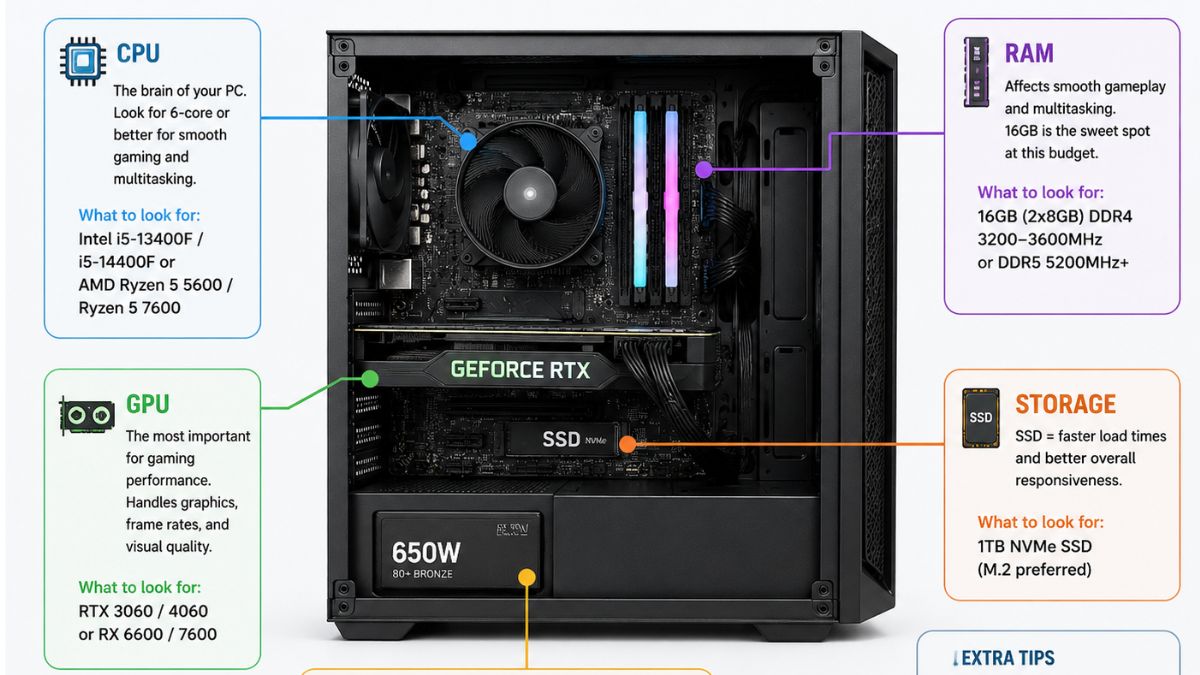
Not every spec on the box matters equally. Here’s where to actually focus your attention.
CPU
Look for a 6-core CPU at minimum. The Ryzen 5 5500 and 5600GT (AM4 platform) remain solid, affordable choices, while the newer Ryzen 5 8400F moves to the AM5 platform with DDR5 support, giving you a real upgrade path to a Ryzen 7 or 9 chip down the line. On the Intel side, a Core i5-13400F or i5-14400F is excellent if you can find it bundled in a prebuilt near this price—though those chips tend to push total system cost closer to $1000 rather than comfortably under it.
GPU
The GPU is where most of your budget should go, since it’s the component most directly tied to frame rate. An RTX 3050 is the entry point for reliable 1080p performance with ray tracing support, while an RTX 4060 (8GB) is the sweet spot if you can find a build that includes one—it handles 1080p high settings comfortably and gives you some 1440p flexibility with DLSS.
RAM
16GB is the realistic minimum for gaming in 2026. Some builds at this price point still ship with 8GB, which will bottleneck newer titles and multitasking (streaming, Discord, background apps) alongside the game itself. If you can find 32GB at a similar price, it’s a nice bonus for multitasking but not essential for gaming alone.
Storage
A 1TB NVMe SSD is the standard to look for. It affects load times far more than most people expect, and modern game install sizes eat through smaller drives quickly. Avoid any build that pairs a hard drive as the primary boot/game drive—it will feel sluggish even with a strong CPU and GPU.
Power Supply & Cooling
This is the spec most commonly cut at this price. A quality build should include a reputable PSU (look for at least an 80+ Bronze rating) and more than one case fan for airflow. Weak PSUs and single-fan cooling are the easiest way a manufacturer shaves a few dollars off the sticker price—and the first thing to fail or throttle performance under sustained load.
Best Gaming PCs Under $1000 Right Now
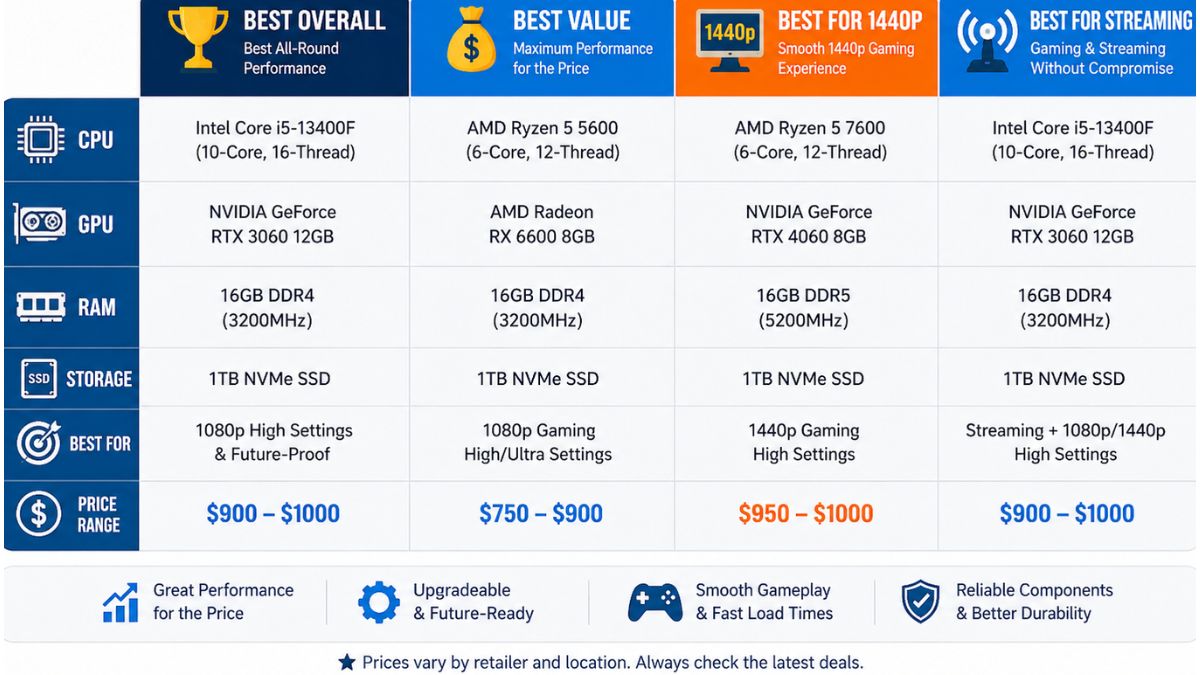
Exact models and pricing shift constantly in this category, so rather than locking in specific SKUs that may be discontinued or repriced by the time you read this, here’s how the current market breaks down by use case. When shopping, match the spec combination to the category that fits you, then compare current listings against it.
| Category | Typical Spec Combination | Best For |
| Best Overall | Ryzen 5 5500/8400F + RTX 4060 (8GB), 16GB RAM, 1TB NVMe SSD | Balanced 1080p gaming across AAA and esports titles |
| Best Value | Ryzen 5 5500 + RTX 3050, 16GB RAM, 1TB NVMe SSD | Tightest budget while still hitting 60+ FPS at 1080p |
| Best for 1440p Headroom | Ryzen 5 7600/Core i5-13400F + RTX 4060 (8GB), 16GB+ RAM | Gamers who want some 1440p flexibility via DLSS/FSR |
| Best for Streaming & Multitasking | Ryzen 7-class CPU + RTX 4060, 16-32GB RAM, 1TB NVMe SSD | Gaming while recording, editing, or running background apps |
A few practical notes on shopping this list:
- Best overall builds are the safest pick if you’re not sure which category fits—this spec combination shows up repeatedly across current market listings because it’s the most balanced use of a $1000 budget.
- Best Value builds trade a bit of GPU headroom for a lower price, which makes sense if esports titles or older/less demanding games make up most of your library.
- Best for 1440p: Headroom builds lean on a stronger CPU to avoid bottlenecking the GPU, since 1440p is more CPU-sensitive than 1080p in many titles.
- Best for Streaming & Multitasking builds prioritize extra RAM and a higher core-count CPU, since background encoding and multitasking apps compete with the game for resources.
Prebuilt vs. Building Your Own at $1000—Which Makes Sense?
For most first-time buyers, a prebuilt makes more sense at this budget. You get a warranty, a system that’s already been assembled and tested, and no risk of buying incompatible parts. The trade-off is that manufacturers sometimes cut costs on less visible components—the PSU, cooling, or case airflow—to hit a price point while keeping the CPU/GPU numbers looking good on paper.
Building your own can stretch your $1000 further if you’re comfortable with self-assembly, since you’re not paying for labor or a pre-tested warranty. It also lets you prioritize the exact components covered above rather than trusting a manufacturer’s balance of trade-offs. If you’ve never built a PC before, though, the time investment and risk of a compatibility mistake are worth weighing against the money saved.
Common Mistakes to Avoid at This Budget
- Skimping on the power supply. A weak or unbranded PSU is the most common way manufacturers shave costs—and the most likely component to cause instability under load.
- Ignoring cooling and case airflow. A single case fan on a build with a mid-range GPU will lead to thermal throttling during longer gaming sessions.
- Prioritizing RGB and case looks over specs. Flashy lighting doesn’t affect frame rates—check the actual CPU, GPU, RAM, and storage before the aesthetics.
- Skipping the SSD. A build with a hard drive as the primary drive will feel slow no matter how strong the rest of the specs are.
- Forgetting the monitor. Even a great $1000 PC is bottlenecked by a low-refresh-rate monitor—pairing it with the right gaming monitor matters as much as the PC itself.
Who Should (and Shouldn’t) Buy a $1000 Gaming PC?
A $1000 gaming PC makes sense if you:
- Primarily game at 1080p and want strong, consistent frame rates across both AAA and esports titles
- Want a prebuilt with a warranty rather than assembling parts yourself—see our full breakdown of prebuilt gaming PCs for more on how to evaluate one
- Are upgrading from an older or entry-level system and want a noticeable performance jump without overspending
You may want to look elsewhere if you:
- Need consistent native 4K gaming—that’s still outside this budget’s realistic range
- Want the highest possible frame rates for competitive esports and are willing to spend more on GPU headroom
- Have a tighter budget—our guide to the best gaming PC build under $700 covers a lower price tier
- Are short on desk space, in which case an all-in-one gaming PC may fit better than a full tower
FAQ
Is a $1000 gaming PC good in 2026? Yes. At this price, current-generation CPUs (Ryzen 5 5500/8400F, Core i5-13400F/14400F) paired with an RTX 3050 or RTX 4060 deliver smooth 1080p gaming in most AAA titles and high frame rates in esports games.
Can you build a good gaming PC for $1000? Yes, and building it yourself can sometimes get you slightly better components than an equivalent prebuilt, since you’re not paying for assembly and warranty coverage. It requires more time and comfort with self-assembly, though.
What GPU should I look for in a $1000 gaming PC? An RTX 3050 is the realistic entry point for reliable 1080p performance with ray tracing support. An RTX 4060 (8GB) is a step up if you can find it in your price range, offering better 1080p headroom and some 1440p capability with DLSS.
Is prebuilt or custom better for a $1000 gaming PC? Prebuilt is generally the better choice for first-time buyers, since it comes with a warranty and avoids compatibility mistakes. Building your own can stretch the budget further if you’re comfortable handling assembly yourself.
What gaming PC under $1000 runs 1080p at 60 FPS? Builds combining a Ryzen 5 or Core i5 CPU with an RTX 3050 or RTX 4060, 16GB of RAM, and a 1TB NVMe SSD are the current standard for reliable 60+ FPS at 1080p in most AAA titles.
Final Verdict
$1000 is a genuinely solid budget for a gaming PC in 2026. The formula that keeps showing up across reliable builds is consistent: a 6-core Ryzen 5 or Core i5 CPU, an RTX 3050 or RTX 4060 GPU, 16GB of RAM, and a 1TB NVMe SSD. Match a build to that spec sheet—and don’t let a flashy case distract you from a weak PSU or single-fan cooling—and you’ll end up with a system that handles both AAA and esports titles comfortably for the next few years.
Ready to compare more options across every budget? Browse TechnoItem’s full gaming PC guide for more picks, reviews, and buying advice.