

Last Updated:
July 15, 2026
Applications Desktop Integrator is designed to eliminate the frustration of switching between a web browser, a spreadsheet, and a legacy database just to complete a single task. For tech enthusiasts who demand efficiency, that disjointed workflow isn’t just annoying; it’s a productivity killer. An applications desktop integrator brings separate software solutions together into one smooth desktop environment, helping users work faster and more efficiently.
In real-world terms, Oracle has its own version (Web ADI), and OpenAI is reportedly building a desktop superapp that follows a similar vision of streamlining desktop workflows. The trend is clear, and the data backs it up.
What exactly is this category of software, and why should you care? Let’s break it down without the marketing fluff.
TL; DR
- An applications-desktop-integrator unifies web, desktop, and legacy applications into a single interface, allowing data sharing and coordinated actions without manual app switching.
- Oracle’s ADF Desktop Integration (ADFdi) lets users edit Fusion cloud data directly inside Excel but requires exact add-in version 5.2.5.29987 and careful setup.
- The broader trend—including OpenAI’s planned desktop superapp—points to a future where AI-driven desktop integrators become the default way we work with software.
What Is an Application Desktop Integrator?
An application’s desktop integrator is a software platform that sits on your operating system and knits together web apps, thick client apps, and even legacy terminal programs so they share context, exchange data, and trigger actions without you constantly copying, pasting, or switching windows.
It’s not a remote desktop or a virtualization layer; it’s more like a universal translator that lives on your machine and makes your tools talk to each other.
It’s like a middleware that replaces the chaos of juggling ten different windows with one coherent workspace. Io). Instead of logging into a CRM, then opening an email client, then hunting for an invoice in an ERP. The integrator surfaces data tied to data from all three inside a single interface. You stay in flow.
How an Applications Desktop Integrator Pulls Everything Together
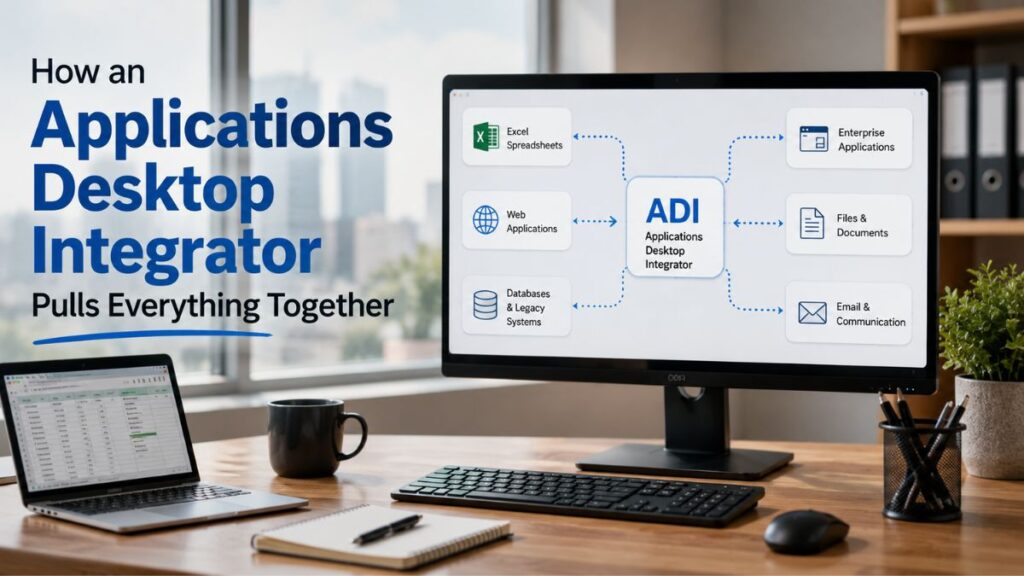
The magic lies in how the integrator intercepts signals between applications. When you click on a customer record in one app, what this means is the integrator captures that context, then automatically updates other apps in real time. No custom APIs or fragile macros needed.
It’s a layer that sits between the presentation and the data, much like office management software consolidates calendars, documents, and communication into one dashboard.
Skeptical, you should be. Many early adopters of “all-in-one” solutions were burned by clunky integrations that broke every time an app updated, but modern desktop integrators handle version drift more gracefully, mostly since they operate at the UI and message layer, not (a detail often overlooked) deep inside each app’s codebase.
The real win is eliminating manual data movement.
According to users of platforms like Oracle’s Web ADI, downloading a spreadsheet, tweaking numbers, and re-uploading becomes a single button click instead of a 15‑step ordeal. That’s what hooks tech enthusiasts who obsess over workflow automation.
Oracle Web ADI: A Real-World Example
Oracle Web Applications Desktop Integrator (Web ADI) is Oracle’s setup that basically links Microsoft Excel to its Fusion web applications, letting users download, modify, and upload transactional data from the comfort of a spreadsheet, with all security and business logic enforced server‑side.
It’s not a generic tool for connecting any two random apps; it’s tightly coupled to the Oracle setup.
That’s where the rubber meets the road for tech enthusiasts who love tinkering. The setup process reveals a lot about the genre’s strengths and headaches. 0 or later. Hard to ignore those numbers. That’s not a suggestion—it’s a pain dependency.
| Tech Spec | Requirement |
|---|---|
| Add‑in version | 5.2.5.29987 |
| Operating system | Windows 10 or 11 |
| .NET Framework | v4.0 or later |
| Host application | Microsoft Excel |
| Backend target | Oracle Fusion web apps |
29987, and anything else will leave you stuck. I’ve seen people waste hours. Now, because they grabbed a just barely older version from a cached link.
You must also manually enable it as a COM add‑in inside Excel Options. Then confirm it appears under Active Application Add‑ins.
Realistically, the payoff is real: once set up, the integrator wizard lets you create layout definitions, map interface attributes, and preview documents hands-on from the web interface. It’s a builder’s dream, though you’ll need patience, and if you’re on Windows 10, the end of Windows 10 support means you should plan a migration to 11 soon anyway.
- Download the correct add‑in—Obtain the ADF Desktop Integration add‑in version 5.2.5.29987 from Oracle’s official channel.
- Enable COM Add‑in in Excel—Open Excel Options, navigate to Add‑ins, select COM Add‑ins, and check the checkbox for the ADFdi entry.
- Verify the version—Confirm the .dll’s Product Version matches 5.2.5.29987 under its file properties.
- Test with the integrator wizard — Launch the Web ADI integrator from Oracle Fusion, create a simple layout, preview a document, and ensure data flows correctly.
Common Misconceptions and Where People Go Wrong
Many believe a desktop integrator is a magical “plug and play” solution that automatically connects any two apps—but the reality is far more detailed.
The Oracle example proves that these tools are often vendor‑specific, version‑sensitive, and require hands‑on configuration that can stump even experienced users.
Yet, ask yourself—the biggest failure point is assuming the installer will handle everything. It won’t.
The COM add-in enablement step is manual—and the exact version number must match. So a mismatch of even a minor build can silently kill the integration. That’s not a bug.
It’s a design choice that enforces compatibility but frustrates newcomers.
Here’s a subtle gotcha: Web ADI doesn’t work with non‑Oracle web apps or desktop tools, and it’s not a general‑purpose integration hub like some commercial platforms. Tech enthusiasts expecting to tie their SaaS dashboard to a local Python script will be disappointed. It’s purpose-built for Fusion.
Still, the concepts apply broadly. Plus, understanding how context‑sharing and layout‑based integration work under the hood prepares you for the next wave of PDF editing on the desktop or any cross‑app automation.
Why Tech Enthusiasts Should Keep an Eye on Desktop Integration
Desktop integration isn’t stuck in enterprise‑grade Oracle environments; it’s bleeding into consumer and prosumer tools in ways that’ll reshape how we interact with computers.
OpenAI’s reported plan to combine ChatGPT, Codex, and the Atlas browser into a desktop superapp is a bellwether. If the probably most influential AI lab thinks a unified desktop experience is the next big thing, it’s worth paying attention.
What does that look like? Instead of opening a separate coding assistant, a browser, and a note‑taking app. You’d have a single overlaying intelligence that understands the context of all three. It could answer questions about a document.
While side by side generating code and pulling web references. The line between applications blurs.
For those obsessing over privacy and security, this trend raises flags, and honestly, a desktop integrator that sees everything you do needs a trusted architecture, and that’s why pairing it with a solid password manager and audit logs becomes non‑negotiable. The promise is huge. But the control plane must be bulletproof.
Already, smaller platforms are proving the concept — even a simple tool that records your screen can form a primitive desktop integrator when combined with AI that reads the on‑screen content and takes actions. It’s a stepping stone toward full‑blown context‑aware workspaces.
People Also Ask
Is an application desktop integrator the same as a virtual desktop?
No.
A virtual desktop streams a full operating system; a desktop integrator coordinates specific applications already installed on your machine so they share data and commands. One virtualizes the environment; the other orchestrates the apps.
Can I use Oracle ADF Desktop Integration with any web application?
No, it only works with Oracle Fusion web applications.
It relies on Oracle‑specific protocols and server‑side logic, so it won’t connect to Salesforce, SAP, or custom apps unless you build heavy custom adapters.
What are the prerequisites for Oracle Web ADI?
You need the ADF Desktop Integration add-in version 5.2.5.29987, Microsoft Excel, Windows 10 or 11, and .NET Framework 4.0+.
The add-in must be enabled as a COM add-in inside Excel Options.
Does a desktop integrator replace my existing applications?
No, it adds to them.
Your apps stay exactly as they are; the integrator sits between them to synchronize data and actions. You still launch Excel, your web dashboard, and your legacy tool normally.
Are there open‑source alternatives to Oracle Web ADI?
There are no direct open‑source replicas with the same structured layout integration, but tools like AutoHotkey or Sikuli can script cross‑app interactions.
They lack the server‑side business‑logic enforcement and layout mapping, making them suitable only for simpler automation.
How does OpenAI’s desktop superapp relate to desktop integrators?
It signals that unifying multiple AI and productivity tools under one desktop shell is a serious product direction. OpenAI’s vision is a desktop integrator that uses AI as the coordination brain, not just a manual layout engine.
The Future of Desktop Integration Is Worth Watching
The applications desktop integrator category may sound niche, but it fits. Just something to consider. Where these meet AI, user experience, and automation—three areas where tech enthusiasts thrive. Oracle’s Web ADI shows the enterprise plan. Wait. Let me rephrase: OpenAI’s superapp hints at the consumerized version.
Here’s the other side of it. Whether you’re knee‑deep in Fusion spreadsheets or just monitoring the space.
The principles of context‑sharing, layout‑based integration, and cross‑app coordination (which work out well in practice) are skills that’ll pay dividends. Stay curious; keep tinkering. And don’t let a version number trip you up.
Author:
TechnoItem Expert Team