8GB RAM vs 16GB RAM Laptop Comparison: Best Choice for 2026

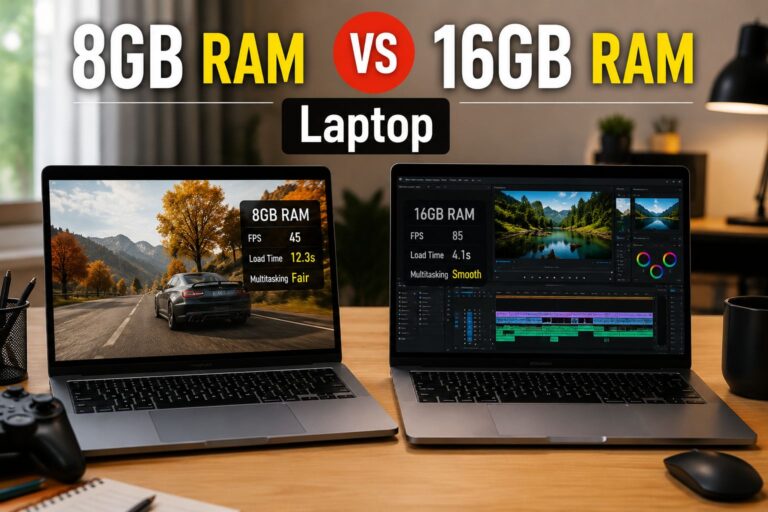
8GB RAM vs 16GB RAM Laptop

(By TechnoItem Expert Team | Last Updated: July 2026)

Quick Answer

8GB RAM vs. 16GB RAM Laptops. For most users in 2026, 16GB RAM is the better choice. Software has grown heavier, browsers consume more memory than ever, and even basic productivity tasks benefit from the extra headroom. That said, 8GB still works fine for light, focused use cases like simple web browsing, note-taking, or Chromebook-style tasks.

Key Takeaways

  • 16GB RAM is the new baseline for a well-rounded laptop in 2026, handling multitasking, video calls, and modern apps without slowdowns.
  • 8GB RAM remains viable for students, light office users, and anyone on a tight budget who sticks to one or two apps at a time.
  • RAM-intensive tasks like video editing, running virtual machines, or gaming strongly favor 16GB or more.
  • Modern operating systems (Windows 11, macOS Sequoia) consume 3–5 GB of RAM at idle, leaving less usable memory than the raw number suggests.
  • If the RAM is soldered (non-upgradeable), choosing 8GB now means living with that limit for the laptop’s entire lifespan.
  • The price difference between the 8GB and 16GB configurations has narrowed significantly in 2026, often just $50–$100.
  • Choose 8GB if budget is the top priority and tasks are genuinely light and limited.
  • Choose 16GB if multitasking, creative work, gaming, or future-proofing matters to you.

What Does RAM Actually Do in a Laptop?

RAM (Random Access Memory) is the short-term workspace your laptop uses to hold active data. The more RAM available, the more apps, browser tabs, and processes can run simultaneously without the system leaning on slower storage.

When RAM fills up, the operating system starts using the hard drive or SSD as overflow memory (called “paging” or “swap”). This is noticeably slower and causes the sluggishness many users blame on an “old” laptop.

Key point: RAM doesn’t make a single app run faster in isolation. It determines how many things can run smoothly at the same time.

Visit Amazon: https://amzn.to/4v2narz

How Much RAM Do Operating Systems Use in 2026?

Before comparing 8GB vs. 16GB, it helps to know how much memory the OS itself consumes.

Operating System Idle RAM Usage (approx.)
Windows 11 (2026 builds) 3.5 – 5 GB
macOS Sequoia 4 – 6 GB
ChromeOS 1.5 – 2.5 GB
Ubuntu Linux 1.5 – 3 GB

Note: These are general estimates based on typical system configurations. Actual usage varies by background processes and installed software.

On a Windows 11 laptop with 8GB RAM, the OS alone can consume more than half the available memory before a single app opens. That leaves roughly 3–4 GB for everything else, which fills up quickly with a browser, a video call, and a document open simultaneously.

8GB RAM vs 16GB RAM Laptop: Which One Is Better in 2026? (Performance Breakdown)

8GB RAM vs 16GB RAM Laptop

16GB RAM outperforms 8GB in nearly every real-world multitasking scenario in 2026. The gap has grown wider as apps, browsers, and operating systems have become more resource-hungry over time.

Where 8GB Holds Up

  • Basic web browsing (5–8 tabs in Chrome or Edge)
  • Word processing and spreadsheets (Google Docs, Microsoft Word)
  • Video streaming (Netflix, YouTube)
  • Light email and calendar use
  • ChromeOS devices, which manage memory more efficiently

Where 8GB Struggles

  • 20+ browser tabs open simultaneously
  • Video calls with screen sharing (Zoom, Teams, Google Meet)
  • Photo editing in Lightroom or Photoshop
  • Running two or more heavy apps at the same time
  • Any modern AAA game or graphically demanding software

Where 16GB Shines

  • Smooth multitasking across many open apps
  • Video editing in DaVinci Resolve or Premiere Pro (at 1080p)
  • Software development with IDEs, local servers, and browser previews open
  • Gaming at medium-to-high settings
  • AI-assisted tools built into modern productivity apps (which increasingly cache models locally)

💡 Pull quote: “In 2026, 8GB RAM is like a two-lane road. It works fine until traffic picks up—then everything slows down.”

Who Should Choose 8GB RAM?

8GB RAM is still a reasonable choice for a specific type of user. Choose 8GB if all of the following apply:

  • Budget is the primary concern, and the price difference matters
  • Daily tasks are limited to browsing, email, documents, and media playback
  • The laptop runs ChromeOS (which manages memory far more efficiently than Windows or macOS)
  • The device will be used for a short period (1–2 years) before upgrading
  • The RAM is upgradeable, so more can be added later if needed

A good example is a student using a Lenovo IdeaPad Chromebook with 8GB RAM for class notes, Google Docs, and video lectures. That’s a genuinely appropriate use case for 8GB in 2026.

Common mistake: Buying an 8GB Windows laptop expecting it to handle multitasking “just fine.” Windows 11’s memory overhead makes this a frustrating experience within months of purchase.

Who Should Choose 16GB RAM?

16GB RAM is the right choice for most laptop buyers in 2026. Choose 16GB if any of the following apply:

  • Multitasking is part of a typical workday (many tabs, multiple apps, video calls)
  • The laptop will be used for 3+ years
  • Work involves creative tasks: photo editing, video editing, design, or music production
  • Gaming is part of the plan, even casually
  • The RAM is soldered and cannot be upgraded later
  • Running Windows 11 or macOS as the primary OS

For those browsing the full laptop category for options, nearly every mid-range and above configuration in 2026 ships with 16GB as the standard spec.

Is 8GB RAM Ever Enough for Gaming in 2026?

8GB RAM vs 16GB RAM Laptop

No, 8GB RAM is not enough for a satisfying gaming experience on a Windows laptop in 2026. Most modern games recommend 16GB as a minimum, and with the OS running in the background, 8GB leaves almost no room.

Minimum RAM recommendations for gaming (2026 estimates):

  • Casual/indie games: 8GB (barely workable)
  • Mid-tier titles (e.g., open-world, shooters): 16GB recommended
  • AAA titles and competitive games: 16GB minimum, 32GB preferred

For those also considering a desktop setup, check out prebuilt gaming PC options where 16GB or 32GB is standard, and upgrading RAM is far easier.

Does RAM Speed and Type Matter as Much as Capacity?

Capacity matters more than speed for most users, but type matters for efficiency. In 2026, most laptops ship with either LPDDR5 or DDR5 memory. These are faster and more power-efficient than older DDR4 modules.

  • LPDDR5 (found in thin-and-light laptops): Lower power draw, often soldered
  • DDR5 (found in performance laptops): Faster, sometimes upgradeable

Edge case: On laptops with integrated graphics (like AMD Ryzen with Radeon or Intel Arc), RAM is shared between the CPU and GPU. Having 16GB here is even more important because the GPU carves out a portion of system RAM for itself.

8GB RAM vs 16GB RAM Laptop: Which One Is Better in 2026? (Price vs. Value)

The price gap between 8GB and 16GB laptop configurations has shrunk considerably. In 2026, the difference between an 8GB and a 16GB version of the same laptop model typically runs $50–$100.

Configuration Typical Price Range (2026) Best For
8GB RAM laptop $300 – $600 Light use, ChromeOS, students
16GB RAM laptop $500 – $900 Most users, professionals, and gamers
32GB RAM laptop $900 – $1,500+ Power users, video editors, developers

For a $75 price difference, upgrading from 8GB to 16GB is almost always worth it. The performance and longevity gains outweigh the upfront cost for most buyers.

Decision rule: If the 16GB model costs less than 20% more than the 8GB model, choose 16GB. The added lifespan alone justifies the cost.

If you’re also comparing laptops from specific brands, the Lenovo IdeaPad reviews and the Best Buy Lenovo laptop guide offer solid real-world comparisons across RAM tiers.

Can You Upgrade RAM Later?

It depends entirely on the laptop. Many modern thin-and-light laptops solder RAM directly to the motherboard, making upgrades impossible after purchase.

Before buying, check:

  1. Whether RAM is soldered or uses SO-DIMM slots
  2. The maximum supported RAM (some boards cap at 16GB, even with upgradeable slots)
  3. Whether the warranty covers RAM upgrades

If RAM is soldered: Always buy the highest RAM tier you can afford. There is no second chance.

If RAM uses SO-DIMM slots, starting with 8GB and upgrading later is a viable strategy, though it requires buying compatible modules and some technical comfort.

Conclusion: Which Should You Buy in 2026?

The answer is clear for most people: choose 16GB RAM. The cost difference is small, the performance difference is real, and the longevity advantage is significant. With operating systems and apps consuming more memory every year, 8GB is already showing its limits on Windows and macOS devices.

Actionable next steps:

  • If the budget is tight, look for 16GB configurations in the $500–$700 range before settling for 8GB. Sales and refurbished options often bring 16GB models into budget territory.
  • If buying a Chromebook, 8GB is genuinely fine, and the extra cost for 16GB may not be worth it on ChromeOS.
  • If the RAM is soldered: Never compromise. Buy 16GB minimum.
  • If gaming or creative work is planned: Start at 16GB and consider 32GB if the budget allows.
  • Before finalizing any purchase, confirm whether the RAM is upgradeable. That single fact changes the entire calculus.

For more buying guidance across different laptop brands and configurations, explore the full laptop buying resources or check out the HP Chromebook 14 review for a practical look at how 8GB performs in a real ChromeOS environment.

FAQ

Q: Is 8GB RAM enough for college in 2026?
A: For most college students using Google Docs, Zoom, and a browser, 8GB works but feels tight. 16GB is a better investment for a laptop that’ll last 4 years.

Q: Will 8GB RAM slow down a new laptop?
A: Not immediately, but on Windows 11 or macOS, 8GB fills up quickly during multitasking. Users often notice slowdowns within the first year of regular use.

Q: Is 16GB RAM overkill for everyday use?
A: No. In 2026, 16GB is the practical baseline for Windows and macOS laptops. It handles everyday tasks comfortably and leaves room for growth.

Q: How long will a 16GB RAM laptop last?
A: A 16GB laptop bought in 2026 should remain capable for 5–7 years for most productivity and creative tasks, assuming the processor and storage are also adequate.

Q: Does more RAM improve battery life?
A: Not directly. However, when RAM is insufficient and the system relies on swap memory (using the SSD), it can increase CPU and storage activity, which drains the battery faster.

Q: Is 32GB RAM worth it in 2026?
A: For video editors, software developers, and power users running virtual machines, yes. For general use, 16GB is sufficient, and 32GB is unnecessary.

Q: What’s better: upgrading RAM or buying a new laptop?
A: If the current laptop has upgradeable RAM slots and a capable processor, adding RAM is cost-effective. If RAM is soldered, a new laptop is the only option.

Q: Does RAM matter more than the processor?
A: Both matter, but they affect different things. The processor determines raw speed; RAM determines how many tasks run smoothly at once. For multitasking, RAM often has a bigger visible impact.

Q: Is 8GB RAM good for working from home in 2026?
A: Marginally. Video calls, shared screens, and collaboration tools like Slack or Teams consume significant RAM. 16GB handles a remote work setup far more comfortably.

Q: Can a laptop with 8GB RAM run Windows 11 well?
A: It runs, but not well under load. Windows 11 uses 3.5–5 GB at idle, leaving little room for apps. Performance degrades noticeably when multitasking.

Lenovo IdeaPad Laptop Reviews: Honest Pros, Cons & Best Picks for You

Lenovo IdeaPad Laptop Reviews

Why People Keep Coming Back to the IdeaPad Line

If you’ve ever gone laptop shopping without a clear model in mind, you’ve probably come across the Lenovo IdeaPad series more than once. It shows up everywhere. Students carry it to class, office workers depend on it for daily tasks, and casual users pick it up for browsing, streaming, and getting through the day without overspending. Spend a little time reading through Lenovo IdeaPad Laptop Reviews, and you’ll notice just how wide its appeal really is.

But popularity can be a bit misleading. Just because something sells well doesn’t automatically make it exceptional. Sometimes it simply means it hits that “good enough” mark for a lot of people.

So it’s fair to ask: are IdeaPads actually worth your money?

The honest answer isn’t a simple yes or no. It really comes down to what you need and what you expect. One thing that becomes clear from most Lenovo IdeaPad Laptop Reviews is that this isn’t a one-size-fits-all product. The IdeaPad name covers a whole range of laptops, from very basic, budget-friendly models to mid-range machines that feel surprisingly capable for the price.

Some versions are built to handle everyday tasks without fuss, while others offer enough power to keep up with more demanding work. That’s why reading a few Lenovo IdeaPad Laptop Reviews can be helpful. You start to see the differences between models instead of treating them as the same device.

So rather than judging the entire lineup at once, it makes more sense to look at it piece by piece, the way someone who’s actually spent time using these laptops would.

Visit Amazon: https://amzn.to/4thx4UF

Understanding the IdeaPad Family (It’s Bigger Than You Think)

Entry-Level Models: IdeaPad 1 & IdeaPad 3

These are usually the first laptops people come across, mostly because the price catches your eye. If you’ve spent any time browsing Lenovo IdeaPad Laptop Reviews, you’ll notice these models come up a lot, especially for budget buyers.

They’re designed for the basics. Web browsing, working on documents, watching YouTube, maybe juggling a few tabs at once. Nothing flashy, and to be fair, they’re not trying to be anything more than that.

One thing you’ll notice right away is how light and simple they feel. That can actually be a plus if you just want something easy to carry around. But it also means the build leans heavily on plastic, and the performance is pretty modest. Most Lenovo IdeaPad Laptop Reviews mention this balance clearly: you’re trading power for affordability.

That said, for everyday use, they hold up reasonably well. If your needs are simple and your budget is tight, they make sense. A lot of Lenovo IdeaPad Laptop Reviews highlight them as practical entry-level options, not impressive, but dependable enough for day-to-day tasks.

So yeah, they’re not going to blow you away. But if all you need is a straightforward laptop that gets through the basics without costing too much, they do exactly that.

Mid-Range Models: IdeaPad 5 & Slim Series

This is where things start to get interesting.

The IdeaPad 5 lineup feels like Lenovo actually tried to balance performance and price instead of just cutting corners. You’ll usually find better processors, more RAM, faster SSD storage, and noticeably improved build quality.

The Slim versions, in particular, feel more refined. Thinner, quieter, and just a bit more polished overall.

If you’re someone who works with multiple tabs, edits photos occasionally, or just wants a smoother experience, this is probably the sweet spot.

Higher-End Options: IdeaPad Flex & Creator Editions

Now we’re getting into the more versatile side of the lineup.

The Flex models are 2-in-1 laptops, meaning they can fold into a tablet. It sounds like a gimmick at first, but once you use it for watching content or taking notes, it actually makes sense.

Then there are creator-focused variants with stronger processors and better displays. These aren’t quite workstation-level machines, but they’re more than capable for design work, light video editing, and creative tasks.

Design and Build: Practical, Not Flashy

What You Notice First

When you pick up an IdeaPad, the first impression is usually the same: it’s simple.

No bold colors, no aggressive styling, no attempt to look like a gaming laptop. Just clean lines, a matte finish, and a design that blends in almost anywhere.

That’s not a bad thing. In fact, for many people, it’s exactly what they want.

Materials and Feel

Let’s be honest here.

Lower-end IdeaPads feel… well, budget. The plastic is noticeable, and there’s sometimes a bit of flex in the keyboard deck or lid.

But once you move into the IdeaPad 5 or Slim series, things improve quite a bit. You start getting aluminum finishes, sturdier hinges, and an overall more premium feel.

It’s not luxury, but it doesn’t feel cheap either.

Portability

One thing Lenovo consistently gets right is weight.

Most IdeaPads are easy to carry around. Whether you’re heading to class, commuting to work, or just moving between rooms, they don’t feel like a burden.

Battery life varies by model, but many of them can comfortably last a full workday with moderate use.

Performance: Where Expectations Really Matter

Everyday Use

For basic, day-to-day tasks, even the lower-end IdeaPads hold up better than you might expect. If you skim through a few Lenovo IdeaPad Laptop Reviews, you’ll notice a common theme. They’re not built to impress, but they’re reliable for simple use.

You can keep several browser tabs open, stream videos, reply to emails, and work on documents without much friction. For most casual users, that’s really all they need. And in that sense, these laptops feel smooth enough to get through a typical day. Many Lenovo IdeaPad Laptop Reviews highlight this exact point; they handle everyday work without unnecessary lag.

The limits start to show when you push them a bit harder. Try running too many apps at once, or switch quickly between heavier tasks, and you’ll feel things slow down. That’s not surprising, though. Budget processors and limited RAM can only go so far. It’s something almost every Lenovo IdeaPad Laptop Review mentions: performance is fine within its lane, but it doesn’t stretch much beyond it.

So if your expectations are realistic, the experience stays pretty comfortable. Just don’t expect it to handle everything at once without a bit of struggle.

Multitasking and Productivity

Step up to an IdeaPad 5, and the difference becomes obvious.

Everything feels quicker. Apps open faster, switching between tasks is smoother, and you don’t get that constant sense that the laptop is struggling to keep up.

If your day involves spreadsheets, video calls, and a dozen browser tabs, this is where you’ll start to feel comfortable.

Creative Work and Light Editing

This is where expectations need to be realistic.

An IdeaPad can handle light photo editing and even some video work, especially the higher-end configurations. But if you’re working on heavy projects regularly, you might feel limited.

It’s capable, just not built for intensive workloads day in and day out.

Display Quality: Better Than Expected (Sometimes)

Budget Models

Displays on entry-level IdeaPads are… okay.

They get the job done, but you’ll notice lower brightness, less vibrant colors, and narrower viewing angles. Fine for casual use, not ideal for creative work.

Mid-Range and Above

Here’s where things improve.

IdeaPad 5 and Slim models often come with full HD or even higher resolution displays, with better color accuracy and brightness. Watching movies, editing photos, or just browsing feels more enjoyable.

Some models even offer surprisingly good panels for the price, which is something Lenovo deserves credit for.

Keyboard and Trackpad: Quiet Strengths

Typing Experience

Lenovo has a strong reputation when it comes to keyboards, and even the IdeaPad series benefits from that.

Keys feel comfortable, well-spaced, and responsive. There’s enough travel to make typing feel natural without being too soft or too stiff.

If you spend a lot of time writing or working on documents, you’ll appreciate this more than you might expect.

Trackpad

Trackpads are generally reliable, though not exceptional.

They’re smooth, responsive, and accurate enough for everyday use. Nothing to complain about, but nothing that stands out either.

Battery Life: Consistent, But Model-Dependent

Battery life is one of those areas where the IdeaPad lineup varies quite a bit.

Some models can easily last 8–10 hours with normal use, while others might struggle to get through a full day.

The good news is that most newer models support fast charging, which helps a lot if you’re on the move.

Still, it’s worth checking the specific model before buying, because this isn’t a one-size-fits-all situation.

Pros and Cons: The Honest Breakdown

What People Tend to Like

  • Affordable pricing across most models
  • Comfortable keyboard for long typing sessions
  • Lightweight and easy to carry
  • Wide range of options for different needs
  • Solid performance in mid-range models

Where They Fall Short

  • Build quality can feel cheap on lower-end models
  • Displays on budget versions are underwhelming
  • Not ideal for heavy creative or gaming workloads
  • Battery life isn’t consistent across all models

Who Should Actually Buy an IdeaPad?

Students

If you’re in school or university, an IdeaPad makes a lot of sense.

It’s affordable, portable, and capable enough for assignments, research, and streaming. You don’t need anything overly powerful, and the mid-range models strike a great balance.

Office and Remote Workers

For everyday office work, the IdeaPad 5 or Slim series is a solid choice.

You get enough power for multitasking, a comfortable keyboard, and a design that fits into any professional setting.

Casual Users

If your main activities are browsing, watching videos, and staying connected, even the entry-level models will do just fine.

Just don’t expect them to handle demanding tasks.

When You Might Want to Look Elsewhere

Let’s be real for a moment.

If you’re into gaming, heavy video editing, 3D rendering, or anything that pushes hardware to its limits, the IdeaPad probably isn’t the right tool.

You’d be better off looking at more performance-focused laptops, even if it means spending more.

Real-World Experience: What It’s Like Day to Day

Using an IdeaPad feels… easy.

That’s probably the best way to describe it.

It boots up quickly, handles everyday tasks without drama, and doesn’t get in your way. There’s no learning curve, no unnecessary complexity, just a straightforward experience.

Over time, you start to notice the little things.

The keyboard that makes typing feel effortless. The lightweight design that you stop thinking about. The reliability that lets you focus on what you’re doing instead of worrying about your laptop.

Of course, you’ll also notice the limitations if you push it too far. Slower performance under heavy load, average speakers, and the occasional reminder that this isn’t a premium device.

But for most people, those trade-offs are acceptable.

Final Thoughts: Is the IdeaPad Worth It?

Here’s the honest answer.

The Lenovo IdeaPad isn’t trying to be the best laptop out there, and that’s kind of the point. It’s built to be practical, affordable, and dependable for everyday use. If you’ve spent time going through Lenovo IdeaPad Laptop Reviews, you’ve probably noticed that this balance is exactly what draws people in.

And more often than not, it works.

If you pick the right model for your needs, especially something like the IdeaPad 5, there’s a good chance you’ll walk away happy. It hits that sweet spot between performance, portability, and price without overcomplicating things. Many Lenovo IdeaPad Laptop Reviews highlight this as the main reason it remains such a popular choice.

That said, expectations matter. If you go for the cheapest version and expect high-end performance, it’s likely going to feel underwhelming. That’s a common takeaway across most Lenovo IdeaPad Laptop Reviews. These laptops perform well within their limits, but they’re not built to stretch beyond them.

So it really comes down to knowing what you need.

Choose carefully, match the specs to your usage, and the IdeaPad can be a reliable companion for work, study, and everyday life. And if you’re still unsure, revisiting a few Lenovo IdeaPad Laptop Reviews can help you make that final call with a bit more confidence.