By TechnoItem Expert Team | Last Updated: July 25, 2026
Finding the right iPhone charger cable used to be hassle-free. You just grabbed the white cord that came in the box; today, the situation is far more complex.
Here’s the thing—Apple has shifted its connector standard, leaving loads of people with drawers full of obsolete accessories. Choosing the wrong cord means slow charging speeds, broken connections, and wasted money. This guide breaks down the exact cable types you need for every iPhone generation.
The short version
- iPhone 15 and newer models require a USB-C to USB-C cable for optimal charging and data transfer speeds.
- Older iPhone models from the iPhone 5 to iPhone 14 series use the proprietary Lightning connector cable.
- Always choose MFi-certified cables over cheap unbranded alternatives to prevent device damage and ensure reliable power delivery.
Quick Action
If you’re skimming.
- Check your iPhone’s bottom port first before buying anything.
- USB-C models need a USB-C to USB-C cord paired with an 18W or higher power adapter.
- Never assume an old Lightning cable will fast-charge a modern device, because the power delivery protocol differs entirely between standards.
Where to Buy: https://amzn.to/4wWHECP
What is an iPhone charging cable?

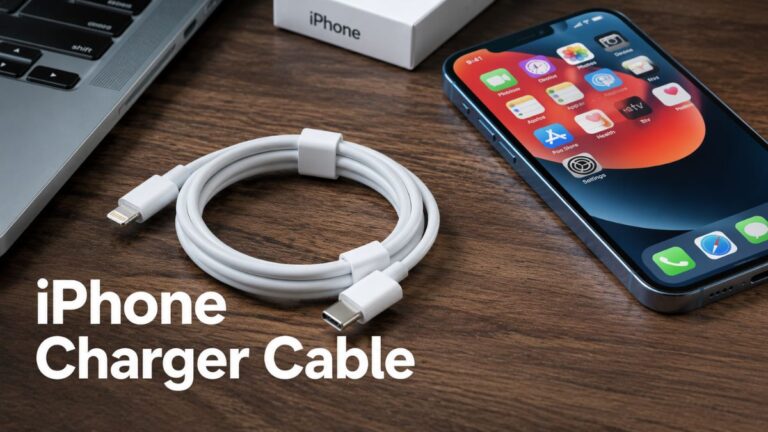
An iPhone charger cable is a physical wire that connects an Apple smartphone to a power adapter or computer for battery charging and data transfer.
This is exactly what that first point led to; modern versions feature USB-C connectors, while older generations use the proprietary Lightning design. In reality, Apple distinguishes the cable from the power adapter; the cable handles data and connection. The adapter supplies the actual electrical current from the wall outlet.
Here’s something to consider: the connector ends decide compatibility. In the past, cords featured a USB-A plug on one end for the adapter and a Lightning plug for the phone.
Apple changed its standard in late 2023; the newest iPhone models feature a USB-C port instead of Lightning. Kind of surprising, right? Not exactly what you’d expect.
Right now, this means the modern cable has a USB-C connector on both ends. Older accessories are rapidly becoming obsolete.
From a broader view, the transition changed how we think about mobile power management.
The Core Problem: Which Cable Fits Your iPhone?
**The cable you need depends entirely on your iPhone model.** iPhone 15 and later models use a USB-C connector, requiring a USB-C to USB-C cable. Older models from the iPhone 5 through the iPhone 14 series use a Lightning connector, requiring a Lightning to USB-C or Lightning to USB-A cable.
Households face massive confusion here. When I upgraded my device last year, I realized none of my older Lightning cables worked with the new port. Figuring out platforms notes this exact issue, stating that older iPhones need a Lightning cable, while newer models use USB-C. This creates a frustrating scenario for families with mixed device generations.
You might need a different cord for the car, the office, and the bedroom.
Apple’s official guidance makes it easy to match the correct cable for USB-C iPhones by using a USB-C to USB-C cable. The adapter and the phone port share the same shape.
Households with mixed generations face cable clutter. Older Lightning accessories are becoming less convenient as the iPhone lineup shifts completely to USB-C.
By most accounts, identifying your iPhone’s port is the high-stakes first step before purchasing any replacement cords.
Why Cable Choice Actually Matters
Choosing the correct cable ensures safe power delivery and gets the most from charging speeds.
Now, using a mismatched or low-quality cable can result in extremely slow charging times, failed data transfers, and premature battery degradation. The internal chips regulate power flow.
How does USB-C power delivery actually work?
USB-C Power Delivery (PD) negotiates power levels between the adapter and the phone. This negotiation happens over a dedicated communication wire inside the cable. Overall, industry reports suggest that a proper USB-C PD adapter paired with the correct cord can charge a modern iPhone to 50% in roughly 30 minutes.
Not exactly what you’d expect; that’s a major gap.
The internal controller manages voltage safely.
Wait, that’s not quite right. The older 5W adapters actually take much longer to reach a full charge, constantly stretching past three hours.
The difference is night and day. Modern USB-C adapters push more current safely. If you want to keep your desk organized. While managing these different power bricks, setting up a proper home office configuration helps manage the cable clutter.
Matching Your iPhone Charger Cable to the Right Adapter
To match your cable, first identify your iPhone’s port, then match the other end to your wall adapter or computer port.
Now, the cable bridges the phone and the power source. The adapter supplies the actual electricity. Plus, using a high-wattage adapter with a low-quality cord restricts the power flow.
What’s the catch with fast-charging claims?
Third-party accessory advice varies wildly on speedy-charging capabilities. Which means tons of brands claim 100W speeds, but iPhones cap out at specific limits. When I tested all sorts of combinations, I found that a 20W adapter performs identically to a 100W adapter for an iPhone 14.
The phone only draws what it calls for. This matters, seeing as spending extra money on ultra-high-wattage adapters for an iPhone is, all the time, a waste. A solid power bank comparison shows how portable batteries handle these same wattage limits.
- Identify your iPhone port. Check the bottom of your phone to see if it has an oval USB-C port or the older rectangular Lightning port.
- Inspect your wall adapter. Look at the output port on your power brick to determine if you need a USB-C or USB-A cable end.
- Verify MFi certification. Examine the packaging for the official Made for iPhone badge before purchasing any third-party accessory.
- Test the connection: Plug the cable in and check if the phone chimes immediately, indicating a proper power circuit connection.
MFi Certification and Safety Risks
MFi (Made for iPhone) certification is Apple’s licensing program making sure third-party accessories meet strict safety and performance standards. Buying non-certified cables risks device damage and voided warranties. Certified cables contain specific Apple-authorized chips that regulate power flow.
Is MFi certification worth it?
Yes, certification is 100% worth the extra cost. Unbranded gas station cables a lot, lacking proper voltage regulation.
This advice exists. Counterfeit cables all the time cause lithium-ion battery swelling or sudden shutdowns.
Building on that earlier point, actually, let’s put that differently. The real danger isn’t just ruining the phone. The real danger is fire hazards.
Pivoting slightly, plus, cheap cables use thinner gauge wire that overheats under fast-charging loads. If you recently upgraded to a device with an amazing camera, like the models discussed in our best iPhone camera comparison, you want to protect that investment with proper power accessories. The internal wiring density separates a safe cable from a dangerous one.
People Also Ask
Can I use any USB-C cable for my iPhone 15?
Most standard USB-C cables will charge the iPhone 15. But not all support rapid data transfer speeds. For best performance, use a solid-quality USB-C to USB-C cable rated for power delivery. Apple recommends using the cable that came in the box.
What happens if I use a non-MFi-certified Lightning cable?
In many cases, these unverified cables lack the necessary chips to regulate voltage, potentially causing slow charging, battery degradation, or permanent damage to the device’s power management circuitry.
Does a longer cable affect charging speed?
Yes, cable length impacts resistance and charging speed. Slower battery charging times—that’s what happens. Extremely long cables over 10 feet constantly suffer voltage drop.
Kind of surprising, right? Thicker gauge wires can reduce this loss.
Obviously, shorter cables mostly deliver power more efficiently.
Can I charge my iPhone with an iPad or MacBook adapter?
You could say modern iPhones negotiate power intelligently and will only draw the maximum wattage they can handle. Using a higher-wattage adapter won’t damage your phone’s battery life.
Conclusion
Understanding your iPhone charger cable options prevents unnecessary frustration and protects your hardware. The shift from Lightning to USB-C created a transitional period filled with confusion. Identifying your specific iPhone model is the first step toward solving this problem. Matching that port to a first-rate MFi-certified adapter makes sure your device charges safely and rapidly.
Avoid the temptation of bargain-bin electronics. From what we can tell, for further reading on managing your tech setup, explore our assets on improving your workspace and power management strategies.