By TechnoItem Expert Team | Last Updated: July 30, 2026
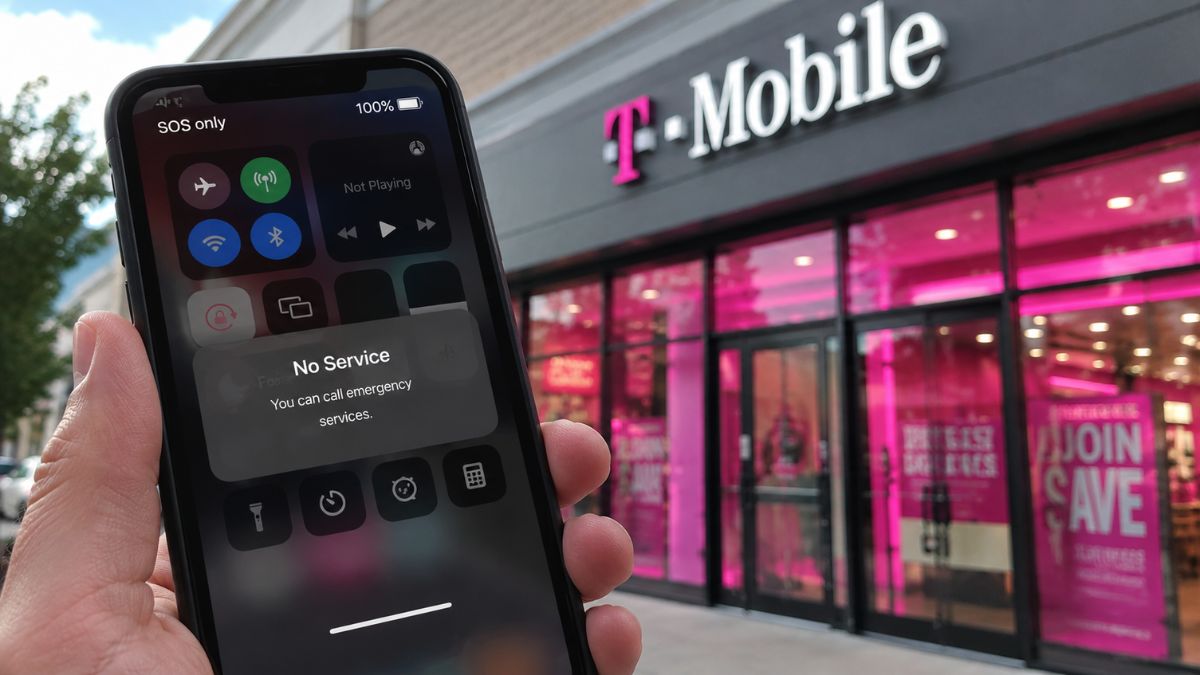
Imagine holding your phone in the middle of a busy workday, waiting for an important client call, only to see “SOS” or “No Service” suddenly appear on your screen. If you are experiencing a T-Mobile outage right now, you are definitely not alone.
Losing cellular connection in today’s always-online world is beyond frustrating. As a tech professional who relies heavily on mobile hotspots while traveling across the USA, I have dealt with dead zones more times than I can count.
When your signal drops unexpectedly, the first thing you need to figure out is whether your phone is broken or if the entire network is actually down.
In this comprehensive guide, I am going to show you exactly how to check the real-time status of your cellular network. We will cover the root causes of dropped signals and walk through the exact steps you can take to fix the issue on your end.
By the time you finish reading, you will know how to stay connected even when the main towers go dark.
Is T-Mobile Down? How to Check Live Status 📉
Before you start messing with your phone’s internal settings, you need to verify if the issue is widespread. Many users immediately panic, thinking their expensive smartphone is broken.
When people ask me, “Is T-Mobile down right now?” I always direct them to look at crowdsourced data before trusting official corporate statements.
Official carriers are sometimes slow to report local outages because they have to verify the hardware failures internally first. That is where third-party outage trackers become your best friend.
Websites like Downdetector aggregate real-time complaints from users across the country. If you see a massive, sharp spike in the graph, it is a clear indicator of a widespread issue.
You can also check social media platforms like X (formerly Twitter). Searching for a T-Mobile outage today will instantly show you if people in your specific city are complaining about the same exact problem.
If you want to dig deeper into how these tracking websites actually work behind the scenes, you can read our deep dive on understanding network tracking tools.
Navigating the T-Mobile Outage Map
If the crowdsourced sites show a spike, your next stop should be the official carrier resources. The official T-Mobile outage map is a helpful visual tool.
It highlights specific zip codes and regions in the USA that are currently undergoing maintenance or experiencing tower degradation.
Keep in mind that this map is heavily focused on planned outages or confirmed tower issues. If a fiber line was just accidentally cut by a construction crew five minutes ago, it might not show up on the map immediately.

What Actually Causes a T-Mobile Network Outage? 🛠️
We often take our mobile connectivity for granted. We expect seamless 5G streaming wherever we go, but the infrastructure keeping us connected is surprisingly fragile.
A network outage T-Mobile users experience can stem from a variety of hardware, software, or environmental factors. Here are the most common culprits.
1. Severe Weather Events
In the USA, weather is the number one enemy of cellular infrastructure. Hurricanes in Florida, tornadoes in the Midwest, and massive snowstorms in the Northeast can physically destroy cell towers.
Even if the tower itself survives the high winds, the local power grids might fail. While towers have backup generators, those generators eventually run out of fuel.
2. Fiber Optic Cable Cuts
Cell towers do not just magically beam internet from space. They are physically connected to the ground via massive underground fiber optic networks.
It is incredibly common for local construction crews or utility workers to accidentally slice through a main fiber line while digging. When this happens, an entire neighborhood loses its T-Mobile service immediately.
3. Software and Routing Glitches
Sometimes, the hardware is perfectly fine, but the software fails. Cellular networks constantly route billions of data packets. A corrupted software update can cause massive routing failures.
For instance, tech outlets like Mashable frequently report on widespread consumer dissatisfaction when carriers push bad software updates that temporarily break voice-over-LTE (VoLTE) services.
4. Network Congestion
Have you ever tried to upload a photo at a massive stadium concert, only to find you have full bars but zero internet? That is network congestion.
When tens of thousands of devices try to ping the same exact cell tower simultaneously, the tower becomes overwhelmed and essentially stops responding to anyone.
If you find your phone battery draining insanely fast while searching for a signal during these events, check out our guide on saving smartphone battery life.
T-Mobile Outage Today: Immediate Troubleshooting Steps 📱
If the Downdetector graphs look completely normal and your friends on the same network have perfect service, the problem is likely isolated to your specific device.
Don’t rush to the carrier store just yet. There are several highly effective troubleshooting steps you can perform right now to force your phone to reconnect to the network.
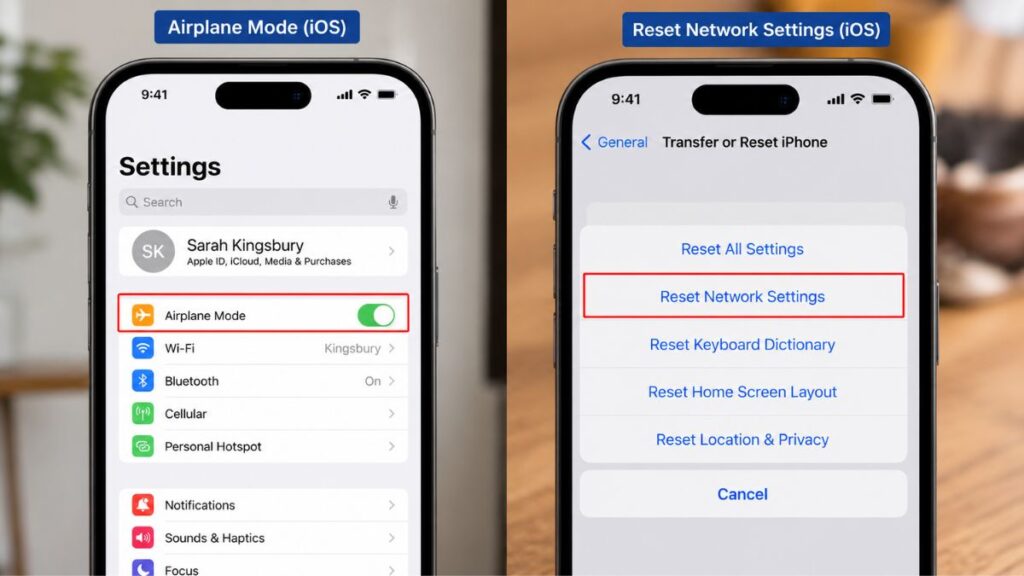
Step 1: The Airplane Mode Trick
This is the oldest trick in the book, but it works 90% of the time. Turn on Airplane Mode, wait exactly 30 seconds, and turn it back off.
This simple action forces your phone’s cellular modem to disconnect from a weak, distant tower and search for the closest, strongest tower available.
Step 2: Perform a Hard Restart
If Airplane Mode fails, power your device down completely. Do not just lock the screen; fully turn it off. Wait one minute, then turn it back on.
Smartphones are essentially mini-computers. They store temporary cache files that can easily become corrupted. A fresh reboot clears the RAM and forces a brand-new connection sequence.
Step 3: Update Carrier Settings
Carriers occasionally release tiny, silent updates to improve network compatibility. If you ignore these, your device might struggle to connect to modernized 5G towers.
On an iPhone, go to Settings > General > About. If an update is available, a prompt will automatically appear. Android users can usually find this under Settings > Connections > Mobile Networks.
If you frequently miss these updates, I highly recommend reading our step-by-step tutorial on managing automatic carrier updates.
Step 4: Reset Network Settings
This is the nuclear option. If nothing else works, resetting your network settings will wipe all customized cellular data, saved Bluetooth devices, and Wi-Fi passwords.
It restores your phone’s connectivity protocols to their factory defaults. On most devices, you can find this under Settings > General > Transfer or Reset > Reset Network Settings.
The Power of Wi-Fi Calling
If a true T-Mobile network outage is happening, no amount of restarting will fix your phone. The towers are simply down.
However, if you are at home or in a cafe with active Wi-Fi, you can completely bypass the cellular towers using a built-in feature called Wi-Fi Calling.
When enabled, your phone will route all your regular text messages and phone calls securely over the local internet connection instead of the cell tower.
To turn it on, simply navigate to your phone’s cellular settings and toggle “Wi-Fi Calling” to the ON position. You will need to enter an emergency 911 address to activate it in the USA.
This simple feature has saved me during countless business trips when I was stuck in the basement of a hotel with zero cellular reception.
For more tips on setting up your devices for remote work success, you might enjoy our article on building a foolproof mobile office.
Staying Connected: Backup Gear and Buying Guide 🎒
If your income relies on you being online 24/7, you cannot afford to have a single point of failure. Relying entirely on one cellular carrier is a massive risk.
When a major T-Mobile outage happens, having a physical backup strategy separates the professionals from the amateurs.
Here is my personal buying guide for staying connected during carrier blackouts.
1. Dual SIM and eSIM Technology
Almost all modern flagship smartphones support Dual SIM or eSIM. This allows you to have two different carrier networks active on a single phone.
I keep my primary number on one network, and I buy a cheap, prepaid eSIM from a completely different network (like Verizon or AT&T) as a backup.
If my main network drops, I simply go into my settings and switch my cellular data to the backup eSIM in less than five seconds.
2. Dedicated Mobile Hotspots
If you are traveling with a laptop, tablet, and a phone, a dedicated mobile hotspot router is a lifesaver. These devices have massive antennas that grab signals much better than smartphones do.
Pros: Connects up to 15 devices simultaneously, saves your phone’s battery life, and provides highly secure, encrypted Wi-Fi on the go.
Cons: It requires carrying an extra device and paying for a secondary data plan.
Top Recommendation: The Netgear Nighthawk M6
This is widely considered the gold standard for mobile routers. It supports ultra-fast 5G, has an Ethernet port for hardwiring laptops, and features a long-lasting battery.
- [Insert Amazon Affiliate Link Here]
Budget Alternative: GlocalMe G4 Pro
If you travel internationally, this device doesn’t require a physical SIM card. You can simply buy data packages for different networks directly through their app.
- Insert Amazon Affiliate:https://amzn.to/4fNTCrF
If you want a full breakdown of the best hardware for digital nomads, check out our mega-review of top-tier portable routers.
Real Case Studies: Learning from Past Outages 📊
To understand why preparation is so critical, we have to look at history. One of the most significant telecommunications disruptions in recent USA history occurred in February 2023.
During this event, over 83,000 customers reported sudden service drops late at night. Users from New York to Los Angeles were completely locked out of voice and data services.
According to industry reports and statements released later, the issue wasn’t caused by a massive storm or a physical cyber attack.
Instead, it was tied to a significant fiber optic circuit failure from a third-party vendor that handled the network’s data routing.
This case study proves a vital point: even if your carrier is doing everything right, third-party vendor failures can still completely disable your service.
This is why having an offline productivity plan is so important. If you struggle to get work done without the internet, take a look at our guide to mastering offline productivity.
Comparison Table: T-Mobile vs. Backup Options
When choosing a backup network to protect yourself during a T-Mobile service outage, you need to understand how the competitors stack up across the USA.
| Carrier Network | Best Use Case | 5G Availability (USA) | Backup Reliability |
| T-Mobile (Primary) | Fastest mid-band 5G speeds, great for urban areas. | Exceptional (Industry Leader) | Strong, but susceptible to regional tower routing bugs. |
| Verizon (Backup) | Unmatched rural coverage and stability along highways. | Growing rapidly. | Excellent. Rarely goes down simultaneously with other networks. |
| AT&T (Backup) | Consistent speeds in office buildings and dense areas. | Solid and reliable. | Great alternative, highly reliable during severe weather. |
| Prepaid MVNOs | Cheap eSIM data for emergency backup use only. | Varies by host network. | Good, but your data is deprioritized during heavy traffic. |
Disclaimer: Network reliability varies heavily based on your exact zip code and local topography.
Final Thoughts on Network Resilience
Cellular networks are incredible feats of engineering, but they are not flawless. Towers go down, fiber lines get cut, and software updates occasionally break things.
When you experience a sudden drop in coverage, your first reaction shouldn’t be panic. Check the outage maps, restart your phone, and see if the problem is local or national.
By utilizing Wi-Fi calling, investing in eSIM backups, and keeping a dedicated mobile hotspot in your travel bag, you completely eliminate the stress of connectivity drops.
You cannot control the cellular towers, but you can absolutely control how prepared you are for the next time the signal fades to zero.
For a complete checklist of everything you need for bulletproof remote work, don’t miss our final thoughts on essential tech for remote professionals.
FAQ (People Also Ask)
- How long does a typical T-Mobile outage last?
Most localized outages caused by software glitches or routing issues are resolved within 2 to 4 hours. However, if a cell tower is physically damaged by a severe storm, repairs can take several days. - Why does my phone say SOS only?
When your phone displays “SOS” or “SOS Only,” it means it has lost connection to your primary carrier’s network. However, it is still able to connect to any available network (like AT&T or Verizon) exclusively for routing emergency 911 calls. - Will I get refunded or credited for the time my service was down?
Generally, major carriers do not automatically issue refunds for short disruptions lasting a few hours. However, if a massive nationwide blackout lasts for multiple days, the carrier will usually automatically apply a small prorated credit to your next monthly bill. - Does a T-Mobile outage affect Metro by T-Mobile customers?
Yes. Metro is an MVNO (Mobile Virtual Network Operator) that runs entirely on the exact same physical cell towers. If the main network goes down, Metro, Mint Mobile, and other subsidiary carriers will also lose service. - How can I use the internet if my cellular data is completely down?
If your cellular data fails, your best immediate option is to connect to a secure, private Wi-Fi network. If you must use public Wi-Fi at a coffee shop or airport, always ensure you connect using a trusted VPN to protect your personal data.