By: TechnoItem Expert Team | Last Updated: June’s 2026
If you are upgrading your home entertainment system, you have likely asked yourself: What is a smart TV, and do I actually need one? Today, finding a television that isn’t “smart” is incredibly difficult. Over the last decade, televisions have evolved from simple display monitors into highly advanced, internet-connected computers that serve as the central hub of your living room.
Whether you are looking to stream 4K movies, play cloud-based video games without a console, or control your smart home lighting directly from your remote, modern televisions do it all.
In this comprehensive guide, we will break down exactly how these devices work, compare the top operating systems, and help you identify the best smart TV 2026 has to offer for your specific needs.
⚡ Quick Answer: What Is a Smart TV?
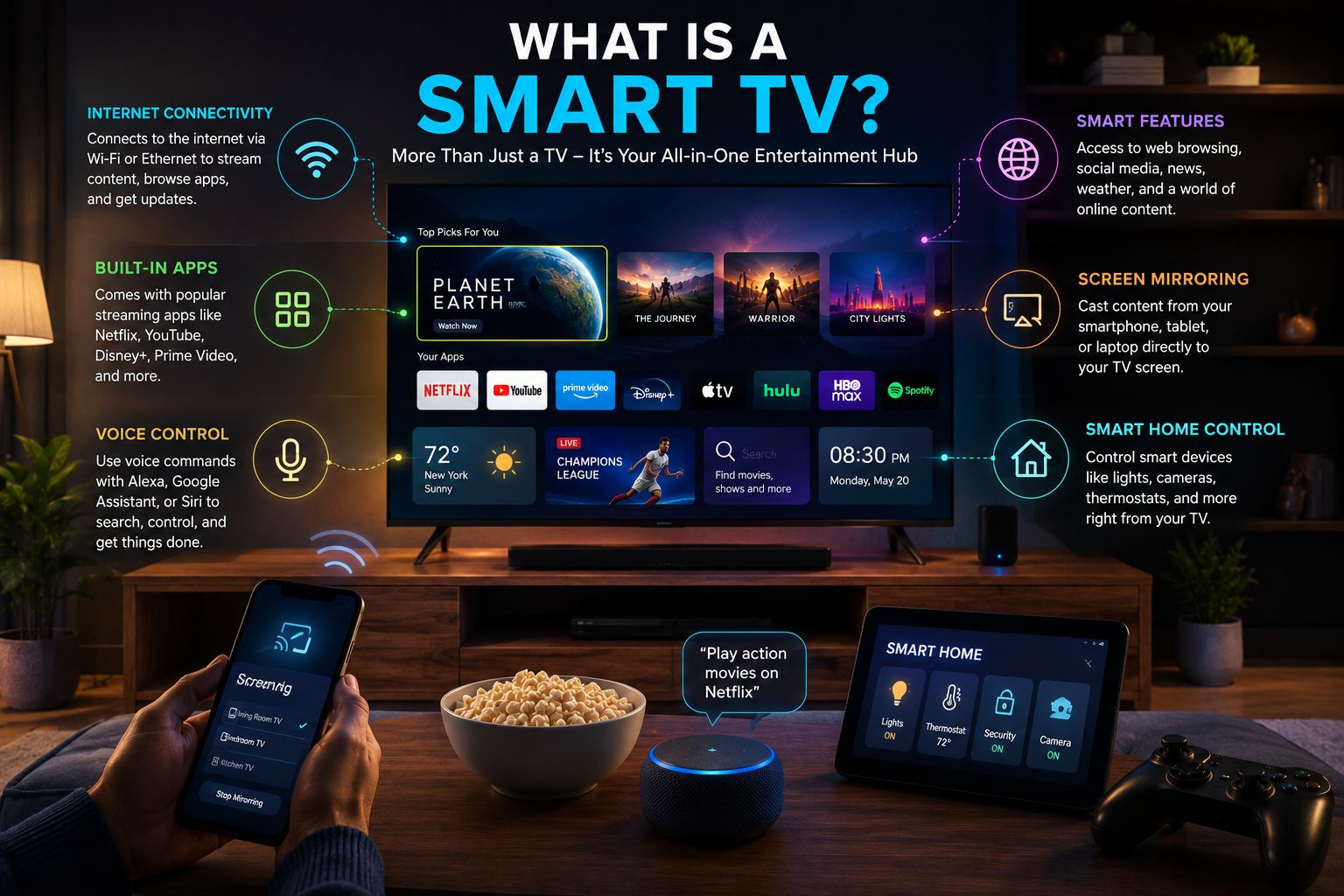
A smart TV is an internet-connected television that streams digital media and entertainment without requiring an external device like a Roku or Apple TV. Featuring built-in operating systems—such as Google TV, Tizen, or webOS—smart TVs allow users to access streaming services, browse the web, and control smart home devices.
📌 Key Takeaways
- No Extra Devices Needed: Smart TVs have built-in Wi-Fi and operating systems to run apps like Netflix, YouTube, and Hulu natively.
- Smart Home Hub: Modern models integrate with Alexa, Google Assistant, and Matter to control your entire smart home.
- Advanced Processing: The latest 2026 models use AI to upscale lower-resolution content into stunning 4K or 8K.
- Cloud Gaming Ready: Many new smart TVs allow you to play AAA video games via cloud services without needing a PlayStation or Xbox.
How Do Smart TVs Work?
To understand exactly what a smart TV is, it helps to look at the technology inside. A smart TV operates much like a giant smartphone or tablet. It contains a processor, memory (RAM), built-in storage, and a dedicated operating system (OS).
When you turn on the television and connect it to your home’s internet network (via Wi-Fi or a hardwired Ethernet cable), the TV’s processor communicates with remote servers to download data. This allows the TV to render high-definition video directly from apps stored on its internal memory.
The Role of Artificial Intelligence (AI)
In 2026, AI is a standard component of smart TV architecture. AI processors analyze on-screen content scene-by-scene, adjusting brightness, color balance, and audio output in real-time. If you are watching an older, non-HD movie, the TV uses AI upscaling to artificially enhance the pixels, making it look incredibly close to native 4K.
Need to optimize your home network for 4K streaming? Check out our guide on maximizing your home internet setup for streaming.
Best smart TV of 2026 on Amazon.
Regular TV vs. Smart TV: What’s the Difference?
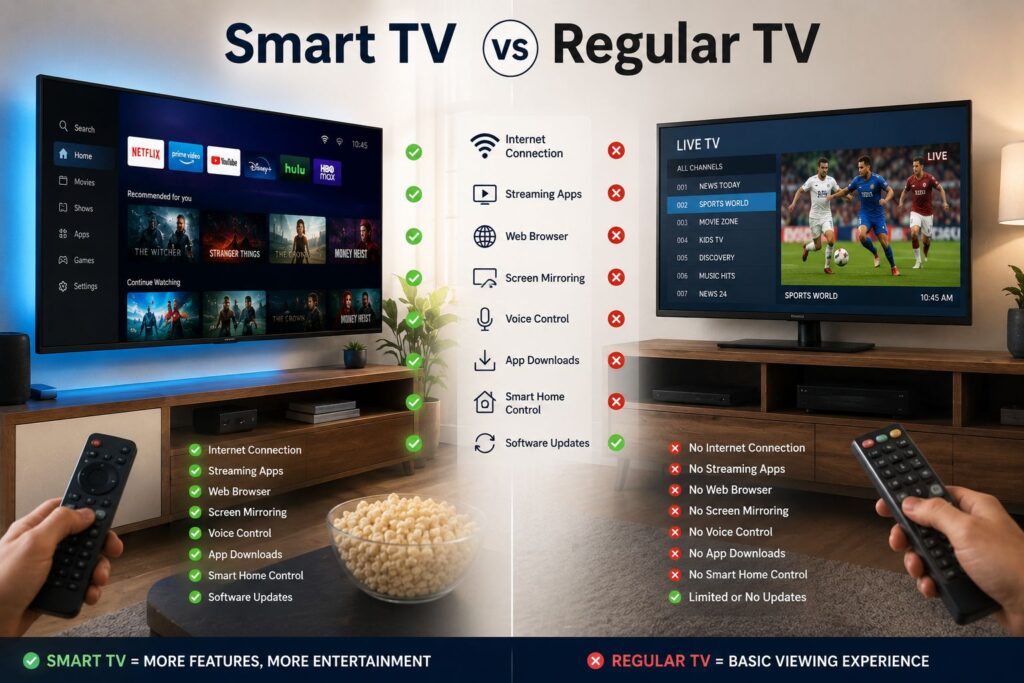
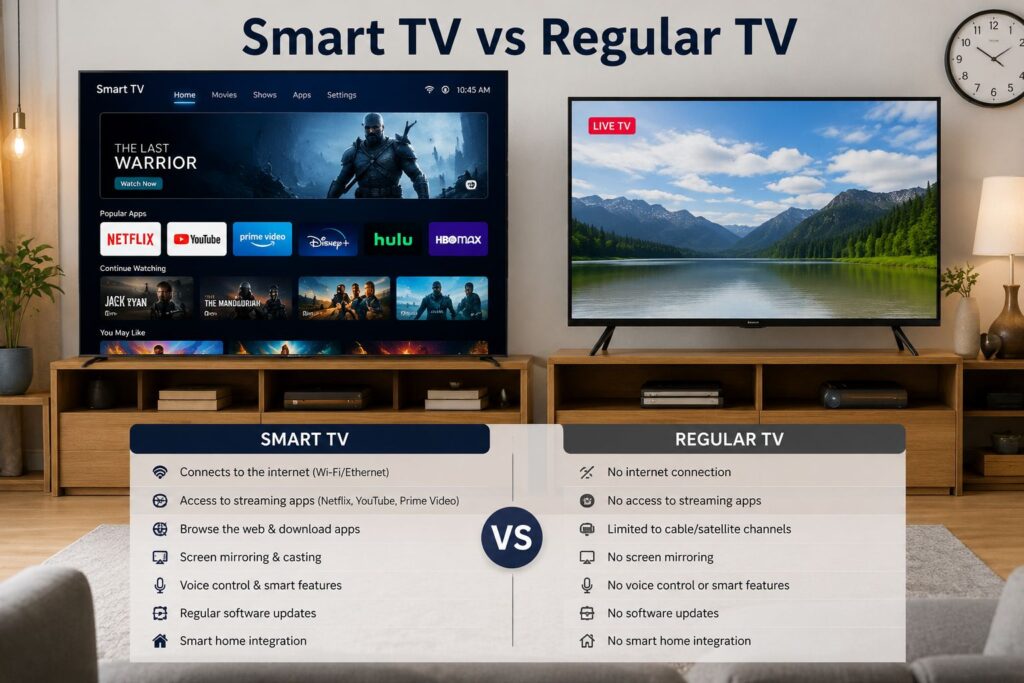
The term “regular TV” (sometimes called a “dumb TV”) refers to older televisions that lack built-in internet connectivity and processing capabilities.
| Feature | Smart TV | Regular TV (“Dumb TV”) |
| Internet Connectivity | Yes (Wi-Fi and Ethernet) | No |
| Built-In Apps | Yes (Netflix, Disney+, etc.) | No (Requires external stick/box) |
| Voice Control | Built-in (Alexa, Siri, Google) | No |
| Smart Home Integration | Yes (Matter, Apple HomeKit) | No |
| Software Updates | Receives regular OS updates | Static firmware |
While you can technically turn a regular TV into a smart TV by plugging in a streaming stick (like an Amazon Fire TV Stick or Roku Ultra) via the HDMI port, natively built smart TVs offer better integration, a single remote, and superior processing power.
The Best Smart TV Operating Systems Compared
Not all smart TVs are created equal. The user experience is dictated entirely by the television’s operating system. Here are the big four dominating the market today:
1. webOS (LG)
Exclusive to LG televisions, webOS is renowned for its intuitive, minimalist “Magic Remote” interface. You can point the remote at the screen like a wand to select apps. It is incredibly fast, offers great smart home integration, and is widely considered one of the best platforms for gamers.
2. Tizen (Samsung)
Samsung uses its proprietary Tizen OS. It features a sleek bottom-bar menu that doesn’t obstruct your viewing experience. Tizen is famous for its “Gaming Hub,” which allows users to connect a Bluetooth controller and play Xbox Game Pass games directly on the TV without a console.
3. Google TV (Sony, TCL, Hisense)
Google TV (formerly Android TV) is heavily focused on personalized recommendations. By syncing with your Google account, it pulls in movie and show recommendations from across all your streaming subscriptions into one unified home screen.
Looking to build out a full home theater? Combine a Google TV with our top recommendations in our ultimate soundbar setup guide.
4. Roku TV (TCL, Hisense, Roku brand)
Roku is the most user-friendly OS on the market. It is app-agnostic, meaning it doesn’t prioritize Amazon Prime over Netflix or vice versa. Its grid-style layout is perfect for users who want a simple, no-nonsense experience.
Key Features to Look for in the Best Smart TV 2026 Models
If you are shopping for a new display, ensuring it is future-proof is vital. When hunting for the best smart TV 2026 has to offer, keep an eye out for these premium features:
- Wi-Fi 7 Connectivity: The latest standard in wireless internet, Wi-Fi 7, dramatically reduces lag and buffering, which is essential for streaming uncompressed 4K HDR content or cloud gaming.
- Next-Gen Display Tech (QD-OLED & MicroLED): While standard LED TVs are great, modern OLED, QD-OLED, and Mini-LED screens offer infinite contrast ratios, deep blacks, and peak brightness that traditional screens cannot match.
- 144Hz Refresh Rates & VRR: For gamers, Variable Refresh Rate (VRR) and a 144Hz panel ensure ultra-smooth, tear-free gameplay when hooked up to a PC, PS5, or Xbox Series X. (Learn more about setting up your gaming space in our home theater design breakdown.)
- ATSC 3.0 Tuners (NextGen TV): This built-in tuner allows your smart TV to pull in free, over-the-air 4K broadcast television with an antenna.
How to Choose a Smart TV: A Quick Buying Guide
Choosing the right model can be overwhelming. Follow these steps to find the perfect fit for your living room:
- Determine Your Size: Measure your room. A good rule of thumb is to sit at a distance that is 1.5 times the vertical screen size of the TV. Today, 55-inch and 65-inch models are the standard for living rooms. (Read our in-depth guide on how to choose the perfect TV size).
- Set a Budget: You can find excellent budget 4K smart TVs under $500, but premium OLED or Mini-LED models will range between $1,200 and $3,000.
- Check the Ports: Ensure the TV has at least three or four HDMI 2.1 ports, especially if you plan to connect gaming consoles and a soundbar (via eARC).
- Consider the Ecosystem: If your home is filled with Apple devices, look for TVs with AirPlay 2 and HomeKit compatibility. If you use Google Assistant, a Google TV might be best.
Expert Pick: Ready to upgrade? Check out one of the top-rated models that consistently ranks as the best smart TV of 2026 on Amazon.
Pros and Cons of Smart TVs
Before making a purchase, it is important to weigh the benefits against the potential drawbacks.
Pros:
- Convenience: All your entertainment apps in one place with a single remote.
- Decluttered Space: No need for messy wires connecting external streaming boxes. (See our tips on cable management and living room aesthetics.
- Casting Capabilities: Easily cast videos or photos directly from your smartphone to the TV.
- Voice Search: Finding a specific movie across multiple apps takes seconds using voice commands.
Cons:
- Security & Privacy: Because they connect to the internet, smart TVs can be vulnerable to hacking, and manufacturers often collect viewing data.
- Software Aging: After 4-5 years, TV manufacturers may stop pushing OS updates to older models, potentially causing apps to run slower.
- Internet Dependency: Without a strong Wi-Fi connection, the “smart” features are completely useless. (Troubleshoot connection issues with our Wi-Fi troubleshooting guide.
Common Smart TV Myths Debunked
To provide the most accurate E-E-A-T-aligned information, let’s clear up some widespread misconceptions:
- Myth 1: Smart TVs are always listening to you.
- Fact: While smart TVs have voice assistants, they require a physical button press on the remote (push-to-talk) or a specific wake word to activate the microphone. You can also disable the microphone entirely in the settings.
- Myth 2: You have to pay a monthly fee to use a Smart TV.
- Fact: The smart features and the operating system are 100% free. You only pay for the third-party subscription services you choose to use (like Netflix or Max).
- Myth 3: You can’t watch regular cable on a smart TV.
- Fact: Smart TVs still have standard coaxial inputs and HDMI ports. You can easily hook up a cable box or a digital antenna. (For more on modern cable alternatives, visit our cord-cutting guide.
Frequently Asked Questions (FAQs)
- Do I need Wi-Fi to use a smart TV?
You do not need Wi-Fi to use the basic functions of a smart TV, such as watching cable via an HDMI port or playing a DVD. However, without Wi-Fi or an Ethernet connection, you cannot access streaming apps, voice controls, or software updates. - Can a smart TV get a virus?
While incredibly rare, it is technically possible for a smart TV to get malware since it is connected to the internet. To stay safe, only download apps from the official TV app store and keep your firmware updated. - What is the lifespan of a smart TV?
The hardware (the LED/OLED screen) typically lasts between 7 and 10 years with heavy use. However, the software may start to feel sluggish after 4 to 5 years as apps become more demanding. You can always plug a new streaming stick into an older smart TV to refresh its interface. - Can I browse the internet on a smart TV?
Yes. Most smart TVs come with a built-in web browser. However, navigating websites with a standard TV remote can be clunky, so it is usually easier to cast a webpage from your phone to the TV. - How much internet speed do I need for a smart TV?
For a smooth experience, you need a minimum of 5 Mbps for standard high-definition (HD) streaming. If you want to stream in 4K UHD, you will need a consistent internet speed of at least 25 Mbps. - Can I use wireless headphones with a smart TV?
Yes, the vast majority of modern smart TVs feature built-in Bluetooth, allowing you to easily pair wireless headphones, earbuds, or external Bluetooth speakers for private listening. (Check out our list of the best TV audio accessories.
Final Verdict: Is Upgrading Worth It?
If you are still wondering what a smart TV is and whether you should buy one, the answer is a resounding yes. The convenience, picture quality, and all-in-one entertainment ecosystem make them an indispensable part of the modern home.
When searching for the best smart TV 2026 models, prioritize devices with a user-friendly operating system, a 4K resolution, and robust connectivity features like Wi-Fi 7 and HDMI 2.1. By understanding your own viewing habits and budget, you can easily find a display that will serve as the perfect entertainment hub for years to come.