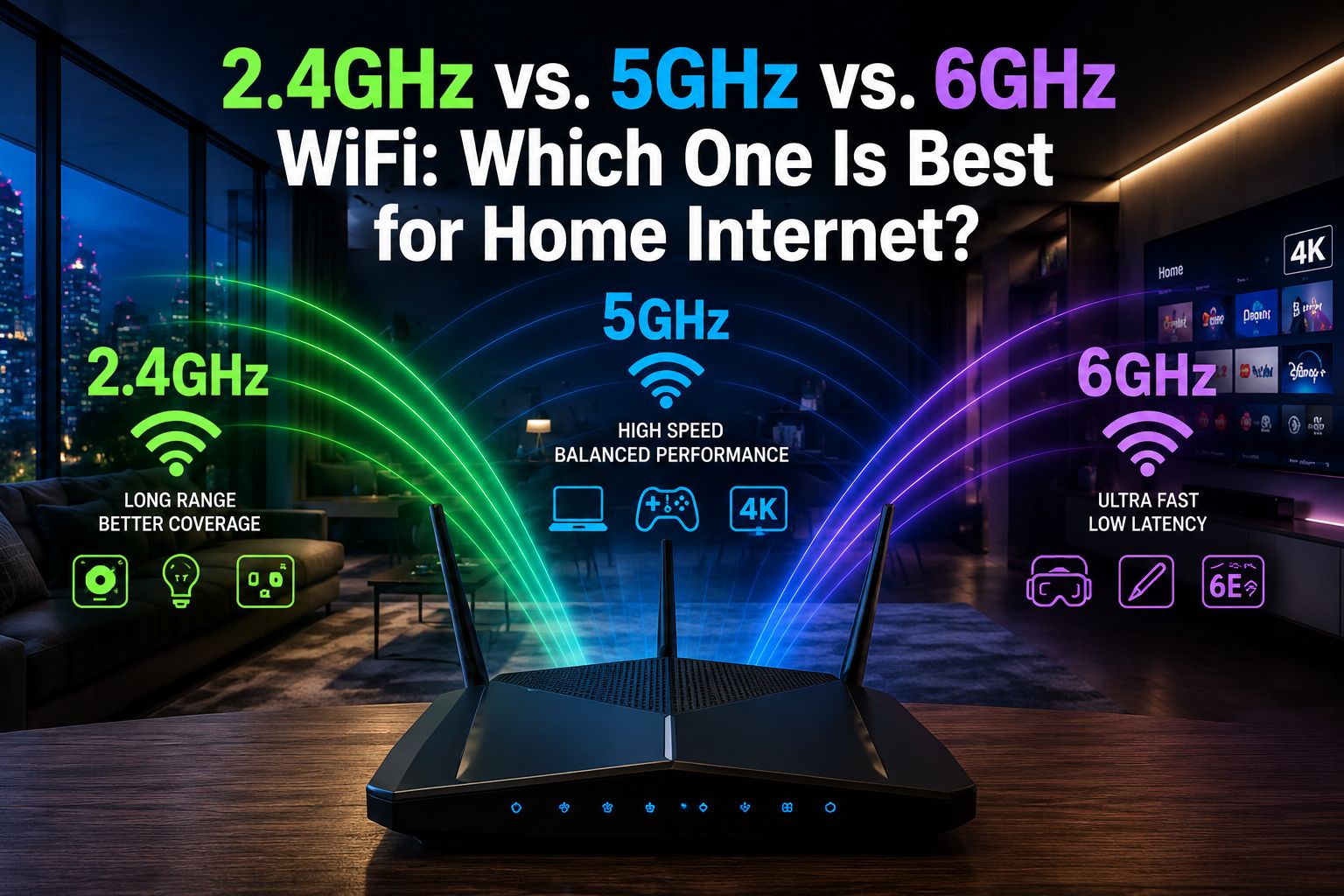
Quick Answer: 2.4GHz vs. 5GHz vs. 6GHz WiFi For most homes in 2026, 5 GHz WiFi offers the best everyday balance of speed and range. Use 2.4 GHz for smart home devices and distant rooms and 6 GHz for high-bandwidth tasks like 4K streaming or gaming—but only if your router and devices support WiFi 6E or WiFi 7.
Key Takeaways
- 2.4GHz travels farther and passes through walls better, but it’s slower and more prone to interference from neighboring networks.
- 5GHz delivers faster speeds at moderate distances and works well for most laptops, phones, and streaming devices.
- 6GHz is the newest band, offering the highest speeds and lowest congestion — but it has the shortest range and requires newer hardware.
- Most modern routers are dual-band (2.4 GHz + 5 GHz) or tri-band (adding 6 GHz), and they can broadcast all bands simultaneously.
- The “best” band depends on your device location, what you’re doing online, and what hardware you own.
- Older smart home devices (thermostats, bulbs, sensors) almost always require 2.4GHz.
- WiFi 6E and WiFi 7 routers are the only ones that support the 6GHz band.
- Interference from microwaves, baby monitors, and neighboring routers is far more common on 2.4 GHz than on 5 GHz or 6 GHz.
What Are the Three WiFi Frequency Bands?
WiFi routers broadcast on radio frequencies, and the three main ones are 2.4 GHz, 5 GHz, and 6 GHz. Each frequency band behaves differently in terms of speed, range, and ability to pass through physical obstacles.
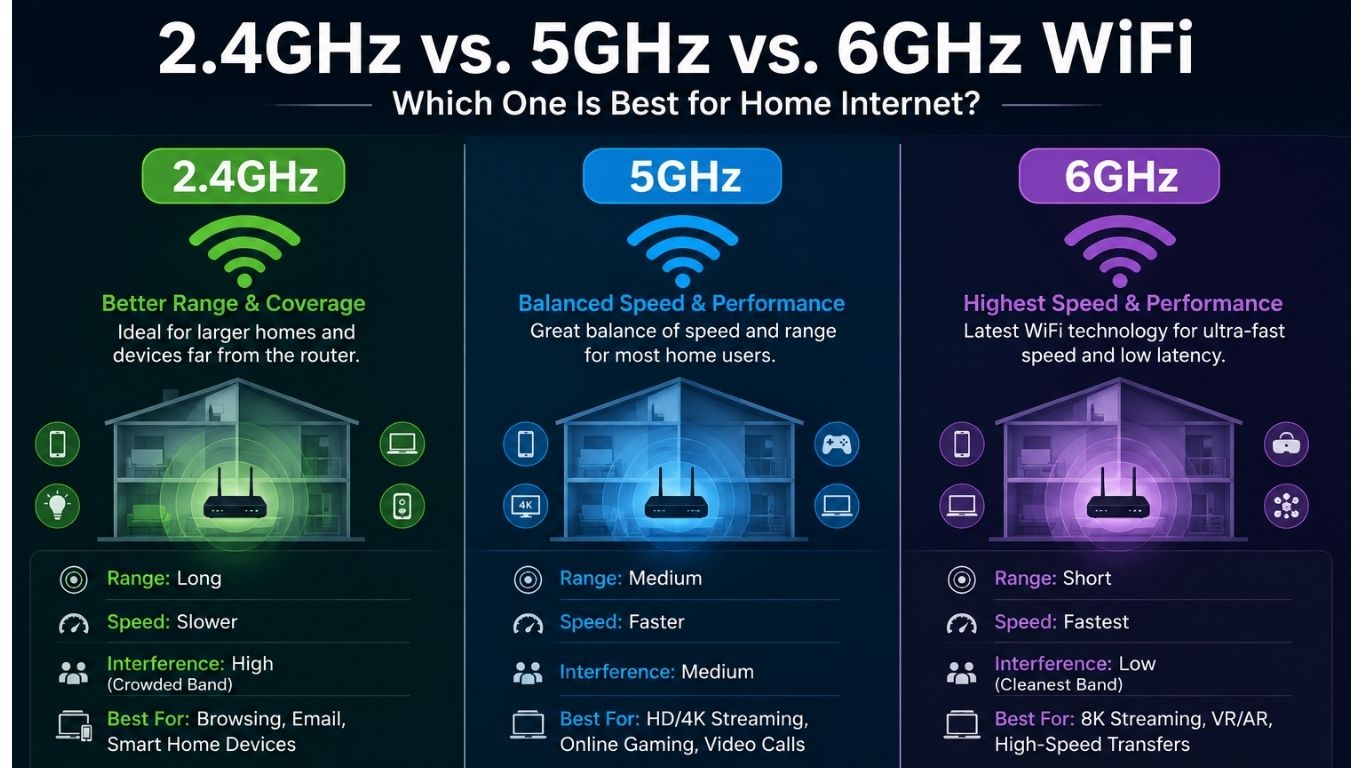
- 2.4GHz — The oldest and most widely supported band. Slower maximum speeds, but excellent range and wall penetration.
- 5GHz — The current standard for most home networking. Faster than 2.4GHz, with good range for typical home sizes.
- 6GHz — Introduced with WiFi 6E (around 2021) and expanded with WiFi 7. Extremely fast and uncongested, but with a limited range.
Think of it like a highway analogy: 2.4 GHz is a wide two-lane road that reaches everywhere; 5 GHz is a four-lane highway; and 6 GHz is a brand-new expressway with almost no traffic—but it only covers a few miles.
How Do Speed and Range Compare Across All Three Bands?
Speed and range work in opposite directions across these three bands. The higher the frequency, the faster the potential throughput — but the shorter the effective distance.
| Band | Max Theoretical Speed | Typical Real-World Range | Wall Penetration | Best Use Case |
| 2.4GHz | ~600 Mbps (WiFi 5) | 150+ feet indoors | Excellent | IoT devices, far rooms |
| 5GHz | ~3.5 Gbps (WiFi 6) | 50–100 feet indoors | Good | Laptops, phones, streaming |
| 6 GHz | ~9.6 Gbps (WiFi 6E/7) | 30–60 feet indoors | Poor | Gaming, 4K/8K video, VR |
Note: Real-world speeds vary significantly based on router hardware, device capability, interference, and building materials. The figures above are general estimates based on published IEEE 802.11 specifications.
Common mistake: Many people assume 6 GHz is always the best choice. It’s not—if your device is two rooms away, the 6GHz signal may drop entirely, while 5GHz or even 2.4GHz would work fine.
When Should You Use 2.4 GHz WiFi?
Use 2.4 GHz when range matters more than speed, or when a device doesn’t support anything else. This band is still essential in 2026 for a large category of devices.
Choose 2.4GHz for:
- Smart home gadgets: light bulbs, plugs, door locks, and thermostats (see the Aqara W200 Thermostat as an example of a device that uses this band)
- Devices located far from the router — in a garage, basement, or back bedroom
- Older laptops, tablets, or phones that don’t support 5GHz
- Basic web browsing and email, where speed isn’t a priority
Edge case: In dense apartment buildings, 2.4GHz can become very congested because dozens of neighboring routers share the same limited channels. If you’re experiencing slow speeds on 2.4GHz in an apartment, switching to 5 GHz (even at a slightly shorter range) will almost always improve performance.
When Should You Use 5 GHz WiFi?
5GHz is the go-to band for everyday use in most homes. It balances speed and range well enough to handle streaming, video calls, gaming, and general browsing without the congestion problems of 2.4 GHz.
Choose 5GHz for:
- Smartphones, tablets, and laptops within a normal room or two of the router
- HD and 4K video streaming on smart TVs
- Video conferencing and remote work
- Online gaming at moderate distances from the router
If you’re shopping for a new router, a solid WiFi 6 dual-band model covers 2.4 GHz and 5 GHz simultaneously. The TP-Link AX1800 Wi-Fi 6 Router is a well-reviewed option that handles both bands efficiently without requiring a premium budget. You can also browse a wider selection of WiFi 6 routers to find the right fit for your home.
Decision rule: If your device supports 5GHz and sits within 50–70 feet of the router with no more than one or two walls in between, always prefer 5GHz over 2.4GHz.
When Does 6 GHz WiFi Actually Make Sense?
6 GHz WiFi makes sense when you need maximum speed in proximity to the router, and your devices support it. WiFi 6E or WiFi 7. It’s not a universal upgrade — it’s a specialist tool.
6 GHz is worth using when:
- You’re doing 4K or 8K video editing and need to transfer large files wirelessly
- You play competitive online games and need the absolute lowest latency
- You use VR or AR headsets that demand high, consistent throughput
- Multiple people in the same room are all streaming or downloading simultaneously
What limits 6 GHz adoption in 2026?
- Requires a WiFi 6E or WiFi 7 router (more expensive than standard WiFi 6 models)
- Your device (phone, laptop, gaming console) must also support GHz—many mid-range devices still don’t
- Walls, floors, and even furniture absorb GHz signals more than lower frequencies
For example, if you’re using a prebuilt gaming PC or a high-end device like the Samsung Galaxy S26 Ultra—both of which support WiFi 6E or WiFi 7—placing them near a 6GHz-capable router will deliver noticeably lower ping and faster downloads compared to 5GHz.
2.4GHz vs 5GHz vs 6GHz WiFi: Which One Is Best for Home Internet in Different Scenarios?
There’s no single winner across all situations. The best band depends on three factors: what device you’re using, where it’s located, and what you’re doing online.
Scenario-Based Recommendations
🏠 Large home (2,000+ sq ft, multiple floors)
- Primary band: 5GHz for most devices
- Secondary: 2.4 GHz for far rooms and IoT devices
- Consider a mesh WiFi system to extend 5GHz coverage rather than relying on 2.4GHz at a distance
🎮 Gaming and streaming room (close to router)
- Primary band: 6GHz (if hardware supports it) or 5GHz
- Wired Ethernet is still the most reliable option for competitive gaming
📱 Apartment with many neighbors
- Avoid crowded 2.4 GHz channels
- Use 5GHz as primary; 6GHz if available
- Check your router’s channel settings and switch to less congested channels manually
🏡 Smart home with 10+ IoT devices
- Keep all smart home devices on 2.4 GHz
- This frees up 5GHz bandwidth for phones, laptops, and streaming devices
Understanding the 2.4GHz vs 5GHz vs 6GHz WiFi Debate: Interference and Congestion
Interference is one of the most overlooked factors when choosing a WiFi band. The 2.4GHz spectrum is shared with Bluetooth devices, microwaves, baby monitors, and wireless cameras — all of which can degrade performance.
- 2.4GHz has only 3 non-overlapping channels (in the US), meaning neighboring routers frequently interfere with each other.
- 5GHz has up to 25 non-overlapping channels, making it far less congested.
- 6GHz has up to 59 non-overlapping channels (in the US, per FCC allocation), making it virtually interference-free as of 2026 — because so few devices use it yet.
Pull quote: “The 6GHz band’s biggest advantage right now isn’t just speed — it’s that almost nobody else is using it yet.”
This congestion gap explains why 5GHz often feels faster than 2.4GHz even when the theoretical speeds suggest otherwise. If you’re experiencing inconsistent WiFi performance, interference on 2.4 GHz is frequently the cause before any hardware issue.
While you’re securing your network, it’s also worth pairing a good router with reliable security tools. A strong antivirus software and a solid password manager can help protect your home network from threats beyond just signal interference.
What Router Do You Need to Access All Three Bands?
To use all three WiFi bands, you need a WiFi 6E or WiFi 7 tri-band router. Standard WiFi 5 and WiFi 6 routers only support 2.4GHz and 5GHz.
| Router Standard | Bands Supported | 6 GHz Support |
| WiFi 5 (802.11ac) | 2.4GHz + 5GHz | ❌ No |
| WiFi 6 (802.11ax) | 2.4GHz + 5GHz | ❌ No |
| WiFi 6E | 2.4GHz + 5GHz + 6GHz | ✅ Yes |
| WiFi 7 (802.11be) | 2.4GHz + 5GHz + 6GHz | ✅ Yes |
Cost consideration: WiFi 6E routers typically start around $150–$200, while WiFi 7 routers range from $250 to $600+ as of 2026. For most households, a good WiFi 6 dual-band router is still the most cost-effective choice unless you have specific high-bandwidth needs.
Also, keep in mind: even if you buy a tri-band router, your devices must also support 6 GHz to use that band. Check your laptop or phone specs before upgrading. If you’re considering a new device, the Apple iPhone 17 Pro Max and Google Pixel 10 Pro XL both support WiFi 7, making them capable of using all three bands.
Conclusion: Choosing the Right WiFi Band for Your Home
The 2.4GHz vs. 5GHz vs. 6GHz WiFi debate doesn’t have a single winner—it has a right answer for each situation.
Here’s the practical summary for 2026:
- Keep smart home devices and far-away gadgets on 2.4GHz. It’s slower, but it reaches everywhere and works with virtually all IoT hardware.
- Use 5GHz as your primary band for phones, laptops, and streaming. It’s fast, reliable, and supported by almost every modern device.
- Add 6 GHz only if you have WiFi 6E/7 hardware and a specific need—gaming, 4K editing, or a very high-device-count household where congestion is a real problem.
- If your home has dead zones, invest in a mesh WiFi system before upgrading to a tri-band router. Coverage gaps hurt more than band selection in most cases.
- Check your devices first. A 6 GHz router is a waste of money if none of your devices support that band.
For most households, a quality WiFi 6 dual-band router combined with smart band assignment (IoT on 2.4 GHz and everything else on 5 GHz) will outperform a poorly configured tri-band setup every time.
Frequently Asked Questions
Q: Can I use all three WiFi bands at the same time?
Yes. A tri-band router broadcasts 2.4 GHz, 5 GHz, and 6 6GHz simultaneously. Devices connect to whichever band their hardware supports and the router assigns.
Q: Is 6 GHz WiFi the same as 5G cellular?
No. GHz WiFi is a local wireless network frequency used by routers. 5G cellular is a mobile network technology used by carriers. They are completely different systems.
Q: Will my old devices work on a new WiFi 6E router?
Yes. WiFi 6E routers are backward compatible. Older devices will connect to the 2.4GHz or 5GHz bands as they normally would; they simply won’t access the 6GHz band.
Q: Why does my 2.4GHz connection feel slow even though the range is good?
The most likely cause is channel congestion from neighboring networks. Try logging into your router and manually switching to a less-used channel (1, 6, or 11 in the US).
Q: Does 6 GHz WiFi penetrate walls?
Poorly. The 6GHz band is significantly absorbed by walls, floors, and dense furniture. It works best in open-plan spaces or when the device is in the same room as the router.
Q: Should I upgrade to WiFi 7 in 2026?
Only if you have multiple WiFi 7 devices and genuinely need multi-gigabit speeds. For most households, WiFi 6 or WiFi 6E is more than sufficient and far more affordable.
Q: What’s the best WiFi band for a home office?
5GHz for most setups. If your router is in the same room and you have a WiFi 6E laptop, 6GHz will give you the lowest latency for video calls and file transfers.
Q: Can smart TVs use 5GHz or 6GHz?
Most modern smart TVs support 5GHz. Fewer support 6 GHz. Check your TV’s WiFi spec sheet — it will list supported bands and WiFi standards.
References
- Wi-Fi Alliance. (2021). Wi-Fi 6E: Expanding Wi-Fi into 6 GHz. https://www.wi-fi.org/discover-wi-fi/wi-fi-6e
- Federal Communications Commission. (2020). FCC Opens 6 GHz Band to Wi-Fi and Other Unlicensed Uses. https://www.fcc.gov/document/fcc-opens-6-ghz-band-wi-fi-and-other-unlicensed-
- IEEE Standards Association. (2021). IEEE 802.11ax-2021 (Wi-Fi 6/6E). https://standards.ieee.org/ieee/802.11ax/7127/
- Wi-Fi Alliance. (2024). Wi-Fi 7 Certification Program. https://www.wi-fi.org/discover-wi-fi/wi-fi-certified-7